
A page can be technically clean, well-written, properly optimized, and still struggle to rank because it is answering the wrong question.
That sounds obvious until you look at how often it happens. A site publishes a 2,500-word article for a keyword, adds the keyword to the title, headings and meta description, builds a few links, then wonders why a shorter page keeps outranking it.
The problem is often not the writing. It is the job the page is doing.
Google’s own guide to Search ranking systems says its systems are designed to understand the meaning and intent behind queries and rank relevant, useful results. Google’s Search Quality Rater Guidelines also separate Page Quality from Needs Met: one asks how well a page achieves its purpose, while the other asks how useful that result is for the particular search.
So when a page has an intent problem, adding more keywords is usually the wrong repair.
What Search Intent Mismatch Means
Search intent is the reason someone performed a search. More practically, it is the outcome they are trying to get from Google.
Take a simple example:
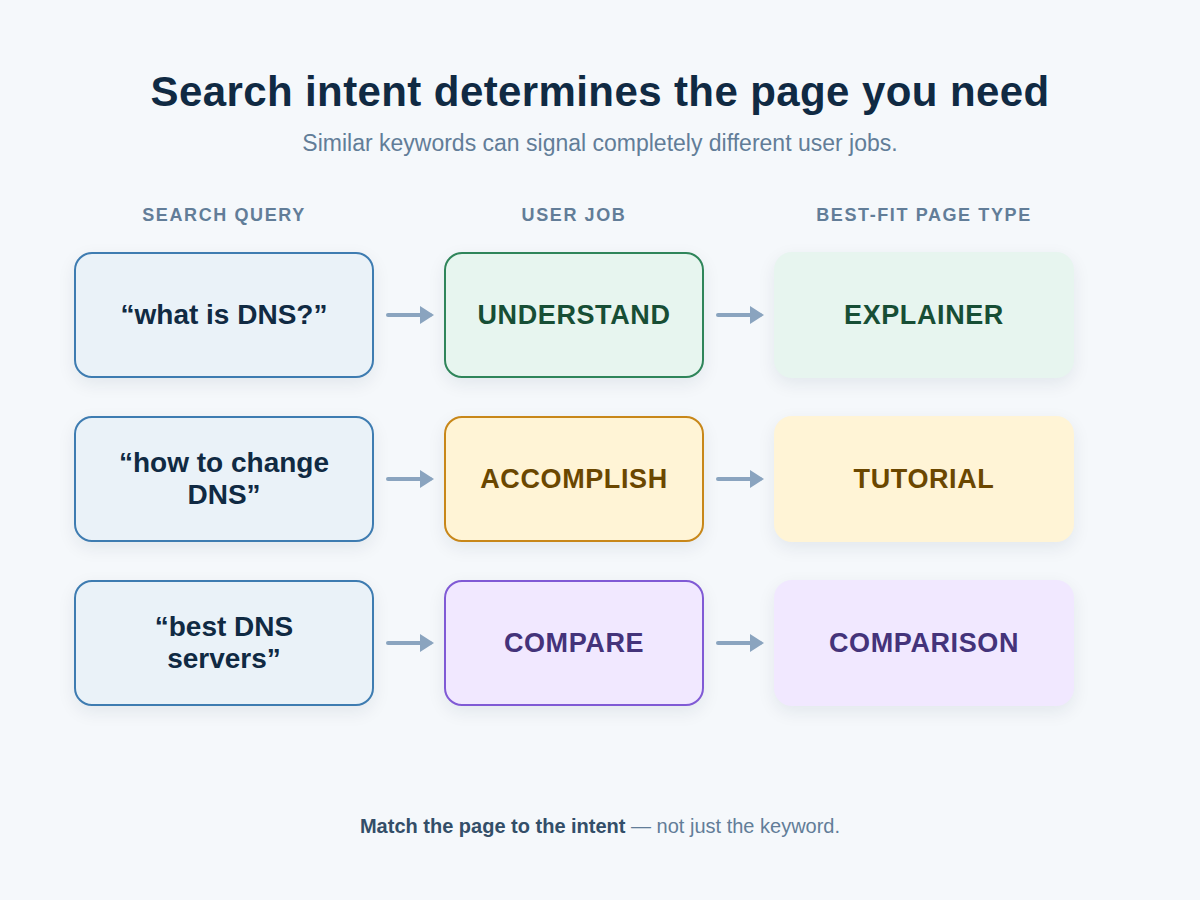
- “What is technical SEO?” suggests a need for explanation.
- “Technical SEO audit checklist” suggests something the searcher can use.
- “Best technical SEO tools” suggests comparison and evaluation.
- “Screaming Frog pricing” suggests a commercial or transactional need.
The subject is similar. The task is not.
This is why I prefer thinking about search intent as a job-to-be-done. What does the searcher need the page to help them accomplish?
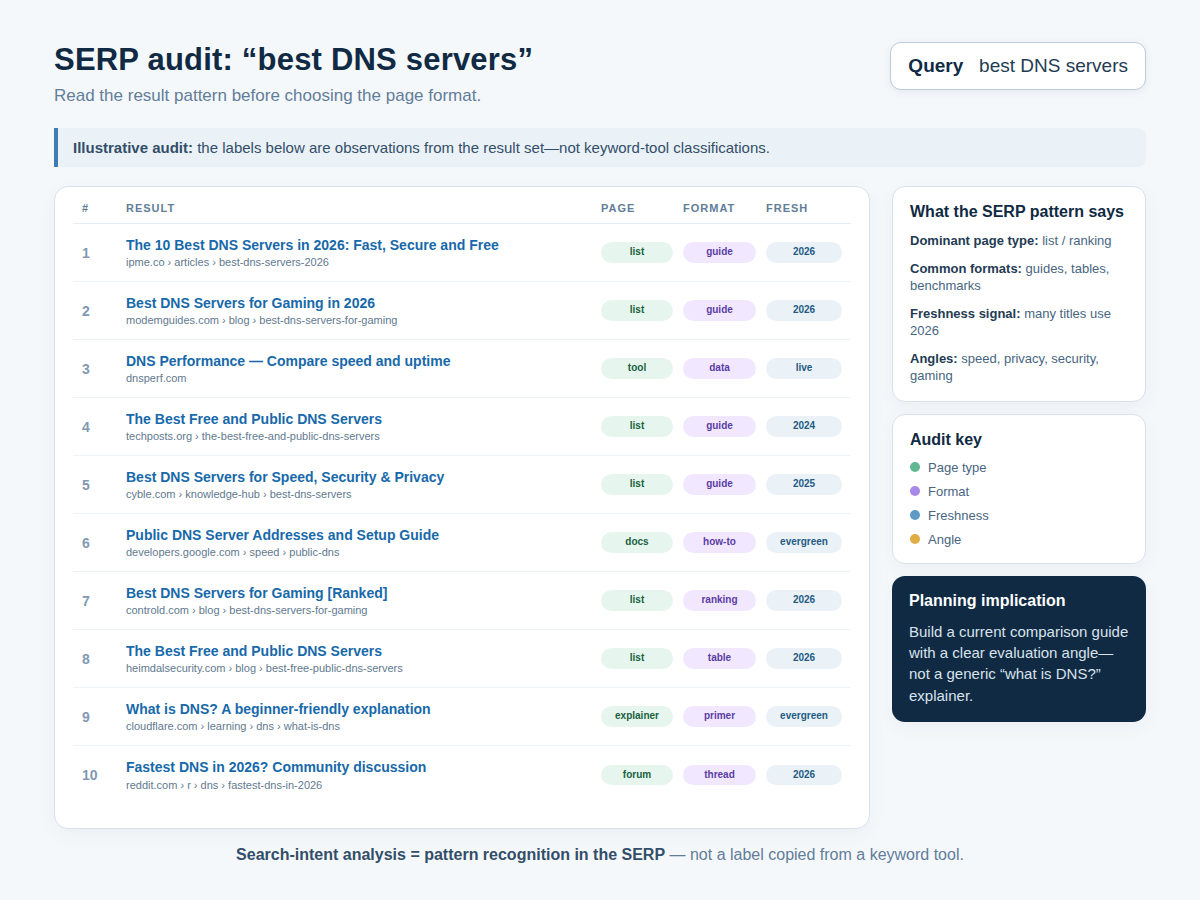
Ahrefs uses a practical version of this idea: look at the dominant content type, content format and content angle in the results. Its research shows that those three elements are useful clues when deciding what kind of page belongs on the SERP. Its search-intent guide provides examples of how the same topic can call for a guide, comparison, review, product page or another format.
The Six Ways a Page Can Miss the Intent
Intent mismatch is not always as simple as “informational versus transactional.” In practice, I would check six separate areas.
1. Wrong intent category
You are answering an educational query with a sales page, or a purchase-oriented query with a general article.
Imagine someone searches for “best laptops for video editing.” A manufacturer’s product page may be relevant to laptops, but it is still a poor substitute for a page that actually compares several options.
2. Wrong page type
The intent may be broadly correct, but Google may be favouring a different kind of page.
If the SERP is dominated by product category pages, forcing an editorial article into the results is an uphill battle. If it is dominated by detailed tutorials, a thin landing page is unlikely to satisfy the same need.
3. Wrong format
A search may clearly call for a comparison, review, step-by-step guide, list, calculator or other usable format.
That distinction is easy to miss because keyword tools often reduce a search down to a phrase and a volume number. The SERP contains richer information.
4. Wrong scope
A user may ask a narrow question while your page tries to cover the entire subject.
For example, “how to fix a WordPress 404 error” does not require a giant guide to WordPress SEO. The answer should get the reader from the problem to the fix.
The reverse can happen too. A broad query may call for a genuinely comprehensive resource, while your page only covers one small technique.
5. Wrong angle
Two pages can both be guides and still approach the query differently.
For a query such as “best SEO tools,” the winning angle might focus on free tools, tools for beginners, agency workflows, technical audits or current-year options. Ahrefs refers to this as the content angle and recommends studying what the leading results emphasize. Its 2026 keyword-intent research also argues that some searches carry mixed intent, which means forcing every query into one rigid bucket can produce bad decisions.
6. Freshness mismatch
Sometimes your page matched the query perfectly when you published it. The search changed afterwards.
Google’s ranking-systems guide explicitly describes freshness systems for queries where users are expected to want newer information. A search about a newly released product is the obvious example, but the same principle applies to technology, regulations, current events, prices and recurring events.
That creates a less obvious SEO problem: your page can become a poor fit without you changing it.
Use the SERP as Evidence, Not Guesswork
This is the first thing I would do before rewriting an underperforming page.
Search the target query yourself and examine the first page. Don’t just look at titles. Look at what Google is actually putting in front of searchers.
- What page types dominate?
- What content formats dominate?
- What angle keeps appearing?
- How current are the leading pages?
- Are there videos, forums, shopping results, maps, news results or other specialised results?
- What job does the searcher appear to be trying to complete?
Ahrefs’ practical framework of content type, format and angle is useful here because it forces you to inspect the actual SERP rather than making an assumption from the keyword alone. See the three-part search-intent framework.
There is a catch, though.
Do not copy the top results.
Use them to determine what the searcher expects, then build something that gives that person a better answer. Google’s people-first content guidance specifically encourages original information, analysis, research, effort and useful experiences rather than pages that simply reproduce what already exists.
How Search Console Exposes an Intent Problem
Search Console is especially useful because it shows the searches for which Google actually displayed your pages.
Google’s Search Console guide says the Performance report can break results down by queries, pages, countries and other dimensions, including clicks, impressions, CTR and position.
Here’s the workflow I would use.
Step 1: Find an underperforming page
Look for a page with meaningful impressions but disappointing clicks or rankings.
Step 2: Inspect its real queries
Open the page in the Performance report and look at the queries producing impressions.
This is where things get interesting. You may find that Google is showing the page for queries you never intended to target.
Suppose you publish:
“How to Choose a Gaming Laptop”
But the page receives large numbers of impressions for:
- gaming laptop price in Nigeria
- best gaming laptop under ₦1 million
- gaming laptop deals
That doesn’t automatically mean the page is broken. It does tell you that Google’s interpretation of the page and the needs of searchers may be wider or different from your original target.
Step 3: Check the page shown for a specific query
Google specifically recommends selecting a query in the Performance report and then reviewing the Pages tab to see which URLs were shown for that search.
This is useful for catching another problem: two or three pages competing for nearly the same search.
That can become a cannibalization problem, where related URLs divide attention and authority instead of building one strong result.
Step 4: Treat low CTR as a clue, not a verdict
A low CTR can indicate that users see a page in search but don’t think it answers their query. Review the title and description and, where necessary, aligning the content more closely with the queries generating impressions.
But don’t make the lazy leap from low CTR to intent mismatch.
A weak title can cause low CTR. So can strong SERP features, a major brand occupying the result above you, or a searcher who already got the information they needed elsewhere.
How to Fix the Page Once You Find the Mismatch
The repair depends on the problem.
| Problem | Better response |
|---|---|
| Educational query, sales page | Create an educational resource |
| Comparison query, single-product page | Build a genuine comparison |
| “How to” query, general essay | Rebuild it as a step-by-step tutorial |
| Narrow query, broad guide | Focus the page on the specific problem |
| Broad query, narrow article | Expand the coverage or create a broader resource |
| Current query, stale information | Update the facts, examples and structure |
| Several URLs serving one intent | Consolidate where appropriate |
The key is to make one coherent change rather than throwing ten SEO tactics at the page at once.
When a rewrite is better than an update
There is a difference between refreshing a page and rebuilding it.
Update the page when the fundamental job is still correct but the information is stale.
Rebuild it when the job itself is wrong.
For example, changing a 2024 product guide to mention a 2026 model is an update. Turning a general product article into a hands-on comparison because the SERP now favours comparisons is a structural rewrite.
Content decay makes the same point from another direction: declining pages can lose visibility because competitors improve, internal pages overlap, or the search intent changes over time.
Do Not Try to Repair Intent with Keyword Stuffing
This is one of the easiest mistakes to make.
If a page is the wrong format, adding the target phrase another 15 times does nothing useful.
Google’s spam policies explicitly identify keyword stuffing as a manipulative practice. Google’s language systems are designed to understand meaning and context rather than rely on crude repetition.
The real repair is structural:
- Change the page type.
- Change the format.
- Change the scope.
- Change the angle.
- Improve the actual answer.
That is a much harder fix than editing five headings, but it is the fix that addresses the problem.
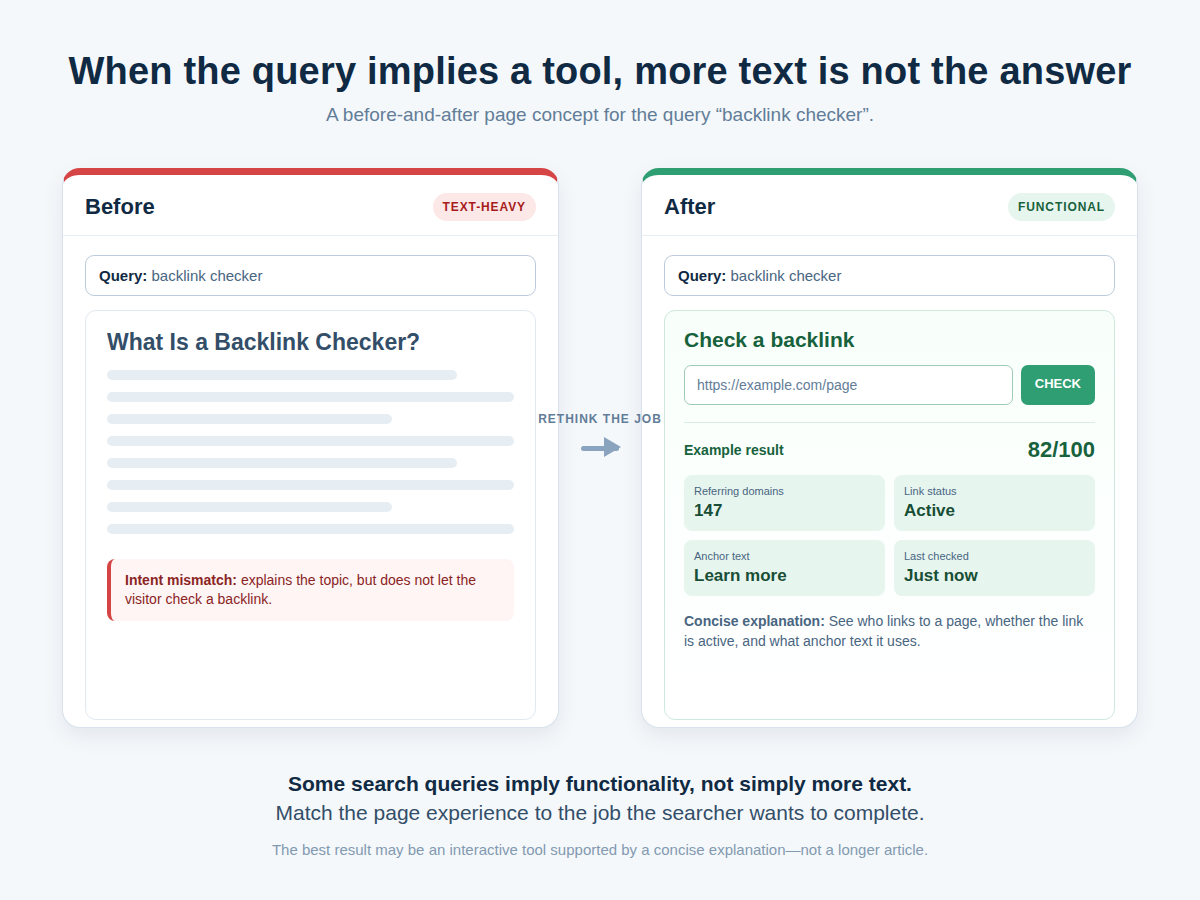
Sometimes the Solution is a Tool, Not a Longer Article
Imagine someone searches for “backlink checker.” A 4,000-word essay explaining backlinks may be useful, but it does not give the user what the query suggests they want: a way to check backlinks.
Intent is Not the Only Reason a Page Fails
A page can match the search intent perfectly and still lose because another result is better established, better linked, more authoritative, more original, fresher or technically easier for Google to process.
Google’s ranking-systems use many signals and operate primarily at the page level, while some site-wide signals and classifiers also contribute to how pages are understood and ranked.
So don’t say:
“It doesn’t rank, therefore the intent is wrong.”
That is bad diagnosis.
Instead ask:
- Is the correct URL indexed?
- Does the page serve the searcher’s job?
- Does its format resemble what the SERP rewards?
- Is the scope appropriate?
- Is the information current?
- Does the page offer original value?
- Are competing pages substantially stronger?
- Are multiple URLs competing for the same query?
What E-E-A-T Has to do With Intent
Matching intent gets the page into the right conversation. It does not make the page trustworthy.
Google’s people-first guidance looks at things such as original information, accuracy, effort, expertise and the ability of the content to give visitors a satisfying result. Google also makes an important clarification about its Search Quality Raters: their ratings do not directly control individual search rankings. Instead, the evaluations help Google assess whether its systems are producing useful and reliable results.
In practice, this means a page should make its value visible.
For a technical article, that may mean showing exactly how something was tested. For a product review, it may mean explaining what was actually used and measured. For a news story, it means identifying the source of important claims and separating confirmed facts from allegations or interpretation.
That is much stronger than adding a generic author box and calling the problem solved.
A Practical Intent Audit You Can Repeat
When I audit a page for intent, I would score seven questions from 0 to 2:
- 0: poor match
- 1: partial match
- 2: strong match
- Does the page match the user’s job?
- Does its page type fit the SERP?
- Does its format fit?
- Does its angle fit?
- Does its scope fit?
- Is the content current enough for the query?
- Does it add useful value beyond the obvious?
A score of 12 to 14 suggests that intent may not be the primary problem.
A score around 9 to 11 suggests that the page needs work.
Below 9, I would seriously consider restructuring the page instead of endlessly polishing sentences.
This is my own diagnostic framework, not a Google metric. Its purpose is to stop an SEO audit from becoming a pile of disconnected recommendations.
One Final Test: What Happens When You Search Like Your Reader?
Forget your target keyword for a moment.
Search the query as if you had never seen your website.
Would you expect:
- an explanation?
- a direct answer?
- a tutorial?
- a comparison?
- a product?
- a current news report?
- a local business?
- a tool?
Then open the result you would personally click.
Ask why.
Was it clearer? More current? Better organised? More specific? More credible? Did it actually do something your page merely talked about?
That comparison is often more revealing than another keyword report.
Final takeaway
Search intent mismatch is best understood as a page-job problem.
You can have the right keyword, the right topic and even technically excellent SEO, yet still build the wrong page for what the searcher is trying to accomplish.
The repair starts with evidence: inspect the SERP, inspect the queries producing impressions in Search Console, identify the dominant page type, format, angle and freshness requirements, then decide whether the page needs a better title, a structural rewrite, a new format, consolidation, a fresh URL or something more substantial.
And don’t confuse matching intent with copying competitors. The goal is to meet the same user need better, with clearer information, stronger evidence and useful original work.
That is a far more durable SEO strategy than stuffing another keyword into another heading.