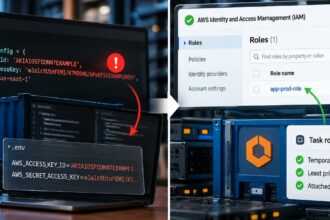

In 2019, an attacker exploited a server-side request forgery vulnerability associated with Capital One’s web application firewall, obtained credentials associated with an AWS IAM role, and accessed data stored in the company’s cloud environment. The incident showed how a weakness in one application could become a route to sensitive information elsewhere.
The application did not need to be a human administrator for its credentials to be dangerous. The permissions available to the compromised workload helped determine what the attacker could reach.
This is the problem with giving cloud applications more access than their jobs require. A reporting service may need to read a database. A deployment pipeline may need to publish a release. Neither automatically needs permission to change employee accounts, delete backups, or read unrelated customer records.
Cloud applications need identities, just as people do. But their access should follow their actual responsibilities, not the permissions that happen to be convenient during setup.
The problem isn’t that applications have identities
A cloud application cannot access a protected API, database, or storage service without some form of authentication. Providers therefore offer machine identities such as AWS IAM roles, Microsoft Entra service principals and managed identities, and Google Cloud service accounts.
These identities can operate without an employee being present. That is exactly what makes them useful for scheduled jobs, background services, automated deployments, and data processing.
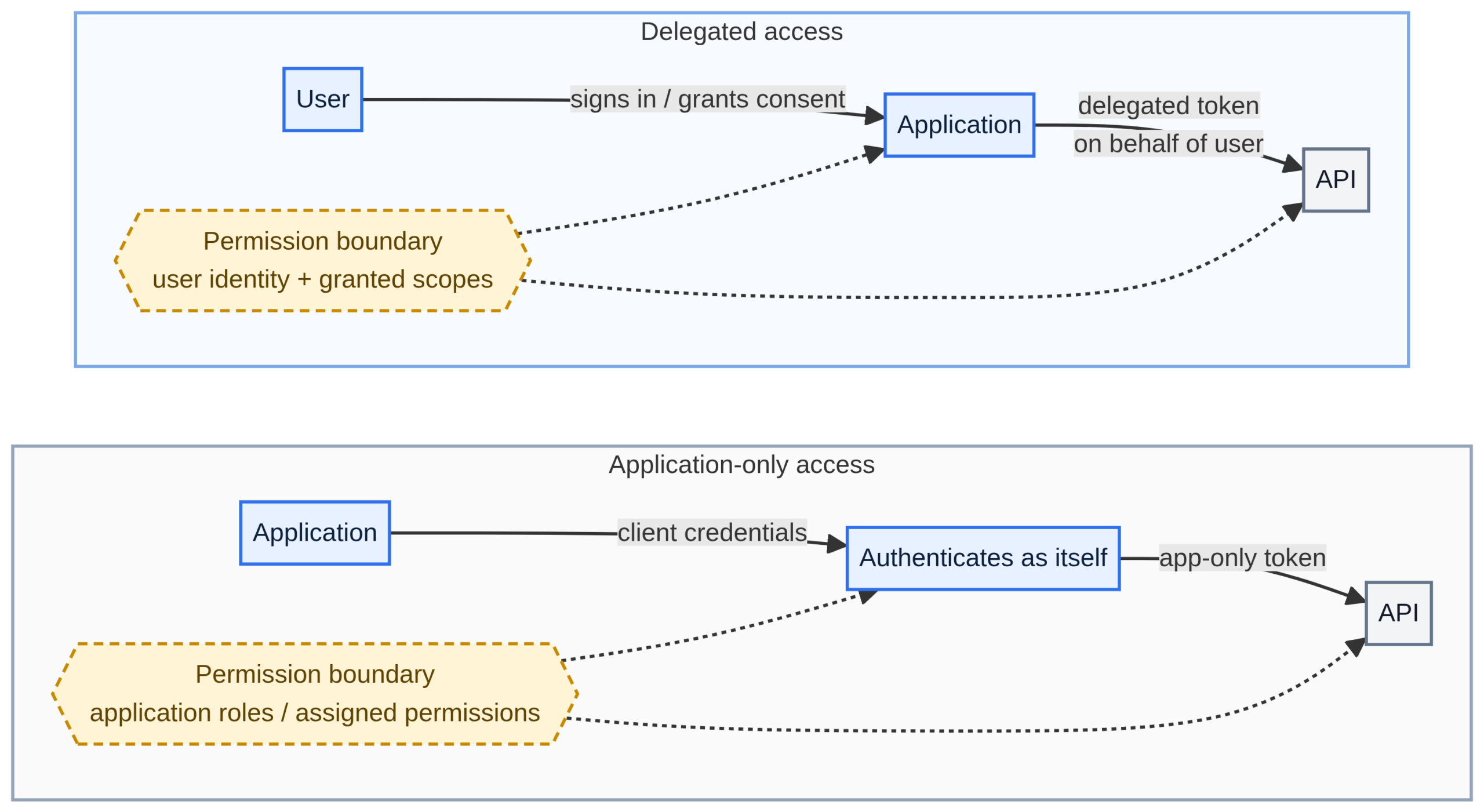
The security difference becomes clearer when an application authenticates under its own identity rather than acting with a user’s delegated authority.
Microsoft’s explanation of application-only access describes how an application can act on its own behalf. Depending on the permissions granted, it may access resources belonging to multiple users. Its authority comes from the application’s permissions, rather than being automatically limited to the resources available to one signed-in employee.
That model is legitimate. A backup service may genuinely need access to data across several accounts. The mistake is granting broad access without establishing why the workload needs it, which resources it must reach, and what damage an attacker could cause after compromising it.
How excessive permissions increase the damage from a breach
Imagine a reporting service that runs at 06:00 each morning. It reads sales records, calculates totals, and sends a report to management.
A developer assigns the service a broad role because that role already allows it to access the database and storage bucket. The report works, so nobody revisits the configuration.
Months later, the application gains another feature. Additional permissions are added. The original permissions remain, even when some are no longer required.
Nothing necessarily looks wrong during normal operation. The service authenticates successfully, produces the report, and exits. But if an attacker exploits the service or steals its credentials, those additional permissions can become useful to the attacker.
The application may be vulnerable for one reason while its permissions create a second, independent problem. Fixing the software vulnerability does not remove excessive access. Removing excessive access does not fix the vulnerability either.
Four ways this exposure develops
1. Broad roles are assigned for convenience
A broad AWS IAM policy, an Azure role with wide resource permissions, or Google Cloud’s basic Editor role may solve an immediate deployment problem. It can also give a workload authority over resources that have nothing to do with its job.
Define the required actions and resources first. A service that reads reports should not receive write and delete permissions unless a documented function requires them.
2. One identity is shared between services
Consider a file-processing service and a reporting job that use the same service account. The file processor handles untrusted uploads, while the reporting job accesses sensitive financial records.
If both authenticate as the same identity, compromising the file processor may give an attacker the authority available to the reporting job. Logs can also become less useful because the identity recorded in an audit event does not necessarily identify which application initiated the request.
Google Cloud’s service account security guidance recommends dedicated identities for applications. A separate identity for each independent workload also makes it easier to revoke one application’s access without disrupting another.
3. Credentials remain valid after the original purpose disappears
Long-lived keys may end up in source repositories, deployment variables, server configuration files, or old backups. A developer can delete the latest copy of a secret while another copy remains in Git history or an abandoned environment.
OWASP identifies long-lived secrets and improper offboarding as separate risks. The problem is especially difficult when nobody knows which application owns a credential or when it was last used.
Prefer managed identities or workload identity federation where supported. These mechanisms can avoid storing permanent access keys in application configuration and can issue short-lived credentials. A short-lived credential still needs appropriate permissions: a compromised workload may abuse its authority while the token remains valid.
4. Deployment pipelines receive too much trust
A CI/CD workflow needs permission to deploy software, but it should not automatically receive authority to read production customer data or rewrite the organisation’s IAM policies.
Google Cloud warns that deployment pipelines can become privilege-escalation paths when attackers manipulate their inputs or trick them into performing actions under the pipeline’s service account.
The key question is what a compromised workflow could do with the credentials it receives, not simply whether the pipeline uses a modern authentication method.
Prioritise identities by possible impact
Auditing every identity at once can become an endless exercise. Start by ranking identities according to the damage a compromise could cause, how exposed the workload is, how much its permissions exceed its task, and how difficult the incident would be to contain.
The following score is a triage heuristic, not a published compliance standard or a substitute for threat modelling. Rate each dimension from zero to three and add the scores.
| Dimension | Lower score | Higher score |
|---|---|---|
| Impact | Access to limited, non-sensitive resources | Customer data, secrets, production changes, or IAM administration |
| Exposure | Constrained workload and narrow trust boundary | Public-facing service, untrusted code, or broadly trusted deployment workflow |
| Permission excess | Permissions closely match the documented task | Broad roles, wildcard actions, or unnecessary cross-project access |
| Credential and containment risk | Short-lived credentials, a dedicated identity, and useful monitoring | Exposed or shared static credentials, weak trust restrictions, or poor attribution |
- Immediate review. Investigate broad production access, sensitive-data permissions, and identities able to grant or impersonate other identities.
- High priority. Review broad write permissions, shared identities, persistent credentials, and cross-environment access.
- Planned remediation. Investigate stale credentials, unused permissions, and roles that exceed the workload’s documented needs.
- Maintain controls. Keep the inventory current and repeat the review when the workload changes.
Do not let the total override an obvious red flag. An identity that can change security policies or read a production secrets store deserves prompt attention even if other controls reduce its score. Conversely, an identity with no recent activity is not automatically unnecessary: a disaster-recovery workload may be idle until it is needed.
Adjust the thresholds to your environment. A small organisation may prioritise a single production database role; a large cloud estate may need additional weighting for internet exposure, data sensitivity, identity chaining, and regulatory obligations.
Find excessive access with the tools each platform provides
Cloud providers offer different permission-analysis tools. They are not interchangeable: one can inspect unused AWS permissions, while another can show application-permission grants or help review service account role assignments.
| Platform | Starting point | What to investigate |
|---|---|---|
| AWS | IAM Access Analyzer and CloudTrail | External access, unused permissions, role policy changes, access-key creation, and unexpected trust-policy changes. |
| Microsoft Entra ID and Azure | Application security operations and Entra audit logs | Highly privileged application permissions, service principals assigned privileged roles, and unexpected permission grants. |
| Google Cloud | Service account guidance and IAM role recommendations | Overbroad roles, service-account key creation, impersonation paths, and unused permissions. |
| GitHub Actions | OIDC trust configuration | Whether only the intended repository, branch, workflow, or environment can obtain cloud credentials. |
These tools identify candidates for review; they cannot infer every business requirement from logs alone. An application owner still needs to verify the workload’s expected behaviour and account for infrequent but valid tasks.
AWS: reduce a reporting role to read-only S3 access
Suppose a reporting service reads files under the reports/ prefix in one S3 bucket. It does not upload files, delete objects, or access unrelated buckets.
A narrower identity policy could look like this:
{
  "Version": "2012-10-17",
  "Statement": [
    {
      "Sid": "ListReportObjects",
      "Effect": "Allow",
      "Action": "s3:ListBucket",
      "Resource": "arn:aws:s3:::company-reporting-prod",
      "Condition": {
        "StringLike": {
          "s3:prefix": [
            "reports/",
            "reports/*"
          ]
        }
      }
    },
    {
      "Sid": "ReadReportObjects",
      "Effect": "Allow",
      "Action": "s3:GetObject",
      "Resource": "arn:aws:s3:::company-reporting-prod/reports/*"
    }
  ]
}
This policy grants list access for the specified prefix and read access to objects beneath it. It does not grant object uploads or deletions through these statements.
Replace the sample bucket name with the real resource, then test the policy before deployment. The application may legitimately need extra permissions, such as access to a customer-managed KMS key to decrypt objects. Bucket policies, service control policies, permissions boundaries, session policies, and VPC endpoint policies can also affect the effective result.
Use infrastructure as code so the permission set can be reviewed, tested, and tracked alongside the application. For example, a Terraform inline policy can express the same restrictions:
resource "aws_iam_role_policy" "reporting_s3_read" {
  name = "reporting-s3-read"
  role = aws_iam_role.reporting.id

  policy = jsonencode({
    Version = "2012-10-17"
    Statement = [
      {
        Sid      = "ListReportObjects"
        Effect   = "Allow"
        Action   = ["s3:ListBucket"]
        Resource = aws_s3_bucket.reports.arn
        Condition = {
          StringLike = {
            "s3:prefix" = ["reports/", "reports/*"]
          }
        }
      },
      {
        Sid      = "ReadReportObjects"
        Effect   = "Allow"
        Action   = ["s3:GetObject"]
        Resource = "${aws_s3_bucket.reports.arn}/reports/*"
      }
    ]
  })
}
This assumes the Terraform configuration already defines aws_iam_role.reporting and aws_s3_bucket.reports. Review the generated plan before applying it.
Don’t trust policy generation blindly
IAM Access Analyzer policy generation can create a policy template from CloudTrail activity recorded over a period of up to 90 days. This is useful for identifying actions a workload has used, but the output is not a complete statement of everything the workload needs.
AWS states that policy generation does not identify action-level activity for data events such as S3 data events, and it does not include iam:PassRole. A quarterly task that was not observed during the selected period can also be omitted. Use the generated policy as a starting point, check the actual CloudTrail configuration, and test both common and infrequent workflows before removing the broader policy.
Azure: assign blob access at the narrowest practical scope
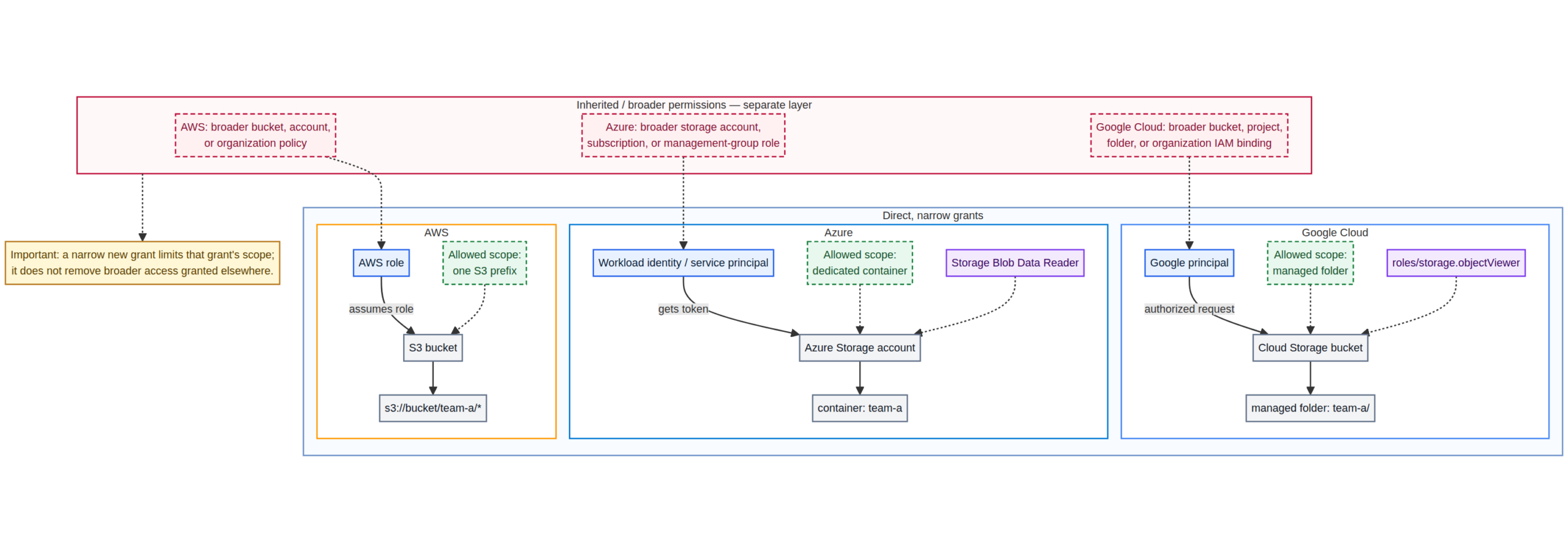
In Azure, the distinction between management-plane and data-plane permissions is important. A role that can manage a storage account may have a different security impact from a role that can read the blobs inside one container.
If a reporting workload only reads files from a dedicated container, start by assigning a data role at that container’s scope rather than at the entire subscription or storage account. The following Azure CLI command illustrates the assignment:
az role assignment create \
  --assignee-object-id "$PRINCIPAL_ID" \
  --assignee-principal-type ServicePrincipal \
  --role "Storage Blob Data Reader" \
  --scope "/subscriptions/$SUBSCRIPTION_ID/resourceGroups/$RESOURCE_GROUP/providers/Microsoft.Storage/storageAccounts/$STORAGE_ACCOUNT/blobServices/default/containers/$CONTAINER"
Set the variables to the actual service principal or managed identity and container. This built-in role allows read access to blobs within the assigned scope and includes the role’s documented container-level actions. It does not reduce access granted by another, broader role assignment; review inherited and direct assignments as well.
If the workload requires fewer permissions than the built-in role grants, create a custom role. For example, a custom role may use container read in Actions and blob read in DataActions, while omitting write, delete, role-assignment, and storage-account management operations. Its definition’s AssignableScopes should be limited to the subscription or management scope where it can be assigned; grant the role itself at the specific container scope.
Azure separates management-plane Actions from data-plane DataActions.
Google Cloud: scope storage access to a managed folder
Giving a service account roles/storage.objectViewer on an entire bucket allows it to view objects and list objects in that bucket. If the application only needs the reports/ area, a managed folder can provide a narrower boundary.
After creating the managed folder and ensuring the bucket is configured for uniform bucket-level access, grant the role to the workload identity at that managed-folder scope:
gcloud storage managed-folders add-iam-policy-binding \
  gs://company-reporting-prod/reports/ \
  --member="serviceAccount:reporting-reader@PROJECT_ID.iam.gserviceaccount.com" \
  --role="roles/storage.objectViewer"
Replace the sample bucket, folder, project ID, and service account.
Do not assume this folder-level grant cancels broader permissions the identity already has. If the service account also receives object access at the bucket or project level, that access remains relevant. Check inherited bindings and test access to objects both inside and outside the intended folder.
For workloads that need to access Google Cloud from an external CI/CD system, consider Workload Identity Federation instead of distributing service-account keys. Restrict the trusted external identities and grant them only the role needed for the deployment.
Restrict which workflows can obtain cloud credentials
Reducing a role’s permissions is only half the job. The organisation also needs to control which workloads can assume that role.
GitHub Actions can authenticate to AWS through OpenID Connect rather than relying on a stored, long-lived AWS secret. The role’s trust policy should check the expected audience and a narrowly defined subject claim. An illustrative condition for an older-style subject claim may look like this:
{
  "Condition": {
    "StringEquals": {
      "token.actions.githubusercontent.com:aud": "sts.amazonaws.com",
      "token.actions.githubusercontent.com:sub": "repo:example-org/reporting-app:environment:production"
    }
  }
}
This is a fragment, not a complete trust policy. It assumes the repository uses this subject-claim format. GitHub changed the default subject format for repositories created after 15 July 2026, and for repositories that opt into immutable subject claims. The newer format includes immutable owner and repository IDs. Confirm the actual token claims and use the matching condition before deploying the policy.
Federation removes the need to store some long-lived cloud credentials, but it does not make every workflow trustworthy. A role can still be misused if its trust conditions accept tokens from untrusted branches or repositories, or if its permissions are broader than the deployment requires.
Detection queries to make identity changes visible
Useful alerts focus on changes that can expand authority: new keys, role-policy changes, privileged application grants, and changes to federation trust. The examples below are starting points. They assume the relevant audit logs are being collected and that the analyst has access to query them.
AWS: watch for IAM policy and credential changes
With CloudTrail delivered to a CloudWatch Logs log group, a CloudWatch Logs Insights query can surface several sensitive IAM API events:
fields @timestamp, eventName, userIdentity.arn, sourceIPAddress, requestParameters
| filter eventSource = "iam.amazonaws.com"
| filter eventName in [
    "AttachRolePolicy",
    "PutRolePolicy",
    "CreateAccessKey",
    "CreatePolicyVersion",
    "SetDefaultPolicyVersion",
    "UpdateAssumeRolePolicy",
    "PutRolePermissionsBoundary",
    "DeleteRolePermissionsBoundary"
  ]
| sort @timestamp desc
| limit 100
Review the actor, affected identity, request parameters, source address, and whether the change came from an expected deployment or administrative process. Create alerts for high-risk events rather than relying on someone to run the query manually.
This query is only useful for events present in the log group. Confirm the trail, region coverage, account coverage, retention, and delivery configuration. CloudTrail Lake is an option for existing customers, but AWS states that it stopped accepting new customers on 31 May 2026; new implementations should select an available logging and query path appropriate to their environment.
Microsoft Entra ID: find application permission grants
In a Log Analytics workspace receiving Entra audit logs, this Kusto Query Language (KQL) query can identify application-management events related to granting app-only or delegated access:
AuditLogs
| where TimeGenerated > ago(7d)
| where Category == "ApplicationManagement"
| where ActivityDisplayName in (
    "Add app role assignment to service principal",
    "Consent to application",
    "Add delegated permission grant"
)
| project
    TimeGenerated,
    ActivityDisplayName,
    Result,
    InitiatedBy,
    TargetResources
| order by TimeGenerated desc
Investigate grants made by unexpected actors, new application identities, permissions involving mail or directory data, and grants that exceed the application’s documented purpose. The available activity labels can vary by operation; verify the labels in your own audit records.
Google Cloud: detect service account key creation
In Logs Explorer, use a query like this to find service account key-creation events in a project:
logName="projects/PROJECT_ID/logs/cloudaudit.googleapis.com%2Factivity"
protoPayload.methodName="google.iam.admin.v1.CreateServiceAccountKey"
Replace PROJECT_ID with the project being investigated. Review the principal who created the key, the service account affected, and whether key creation was expected. Where possible, alert on new keys rather than waiting for a periodic audit.
Automate identity inventories and secret scanning
A spreadsheet is a useful starting point, but it becomes stale quickly in a large cloud environment. Generate an inventory regularly, then enrich it with ownership, intended purpose, privilege level, credential method, last-seen activity, and environment.
For a quick initial inventory, the provider CLIs can list common identity objects:
# AWS: list IAM roles in the current account
aws iam list-roles \
  --query 'Roles[].{Name:RoleName,Arn:Arn,Created:CreateDate}' \
  --output table

# Azure: list service principals visible to the signed-in identity
az ad sp list --all \
  --query '[].{Name:displayName,AppId:appId,ObjectId:id}' \
  --output table

# Google Cloud: list service accounts in a project
gcloud iam service-accounts list \
  --project="PROJECT_ID" \
  --format="table(email,disabled,uniqueId)"
These commands are inventory starters, not a complete identity risk assessment. They have different scope limits: the AWS command lists roles in the current account, the Azure command returns service principals visible to the current directory permissions, and the Google command lists service accounts for the selected project. Repeat across the relevant accounts, tenants, subscriptions, and projects, and include federated identities, access keys, role assignments, and resource-level policies in the broader review.
Credentials also need a preventative control at the code boundary. Enable GitHub secret-scanning push protection where your plan supports it, and add a repository scanner such as Gitleaks to CI. Scan the repository and its history, not only the latest files. A scanner may flag secrets, but it cannot make an exposed credential safe again.
If a real key is found, revoke or rotate it promptly, examine audit logs for use, identify any copies in artifacts or deployment systems, and remove the secret from the repository history where appropriate. Deleting the line from the newest commit is not enough.
Use guardrails without confusing them with permissions
Identity policies describe what a workload can do, but organisations can add higher-level guardrails to constrain the maximum authority available to that workload.
- AWS permissions boundaries limit the permissions an identity-based policy can grant to a role or user. They do not grant permissions by themselves, and resource-based policies can have separate evaluation behaviour.
- AWS service control policies (SCPs) set maximum permissions for identities in member accounts within an AWS Organization. They do not grant permissions, do not affect the management account, and need to be tested carefully before broad attachment.
- Google Cloud IAM deny policies can deny supported permissions even when an allow policy grants them. They apply through the organisation, folder, or project hierarchy, but only supported permissions can be denied.
- Azure role scope and management groups help limit where role assignments can apply. For data access, check both management-plane actions and data-plane actions, as well as inherited assignments.
Read the provider rules before treating any guardrail as a universal safety net. Start with AWS permissions boundaries, AWS SCPs, and Google Cloud deny policies. Guardrails reduce the blast radius of future mistakes, but they do not replace narrow workload policies, proper resource policies, or monitoring.
Account for the operating cost of least privilege
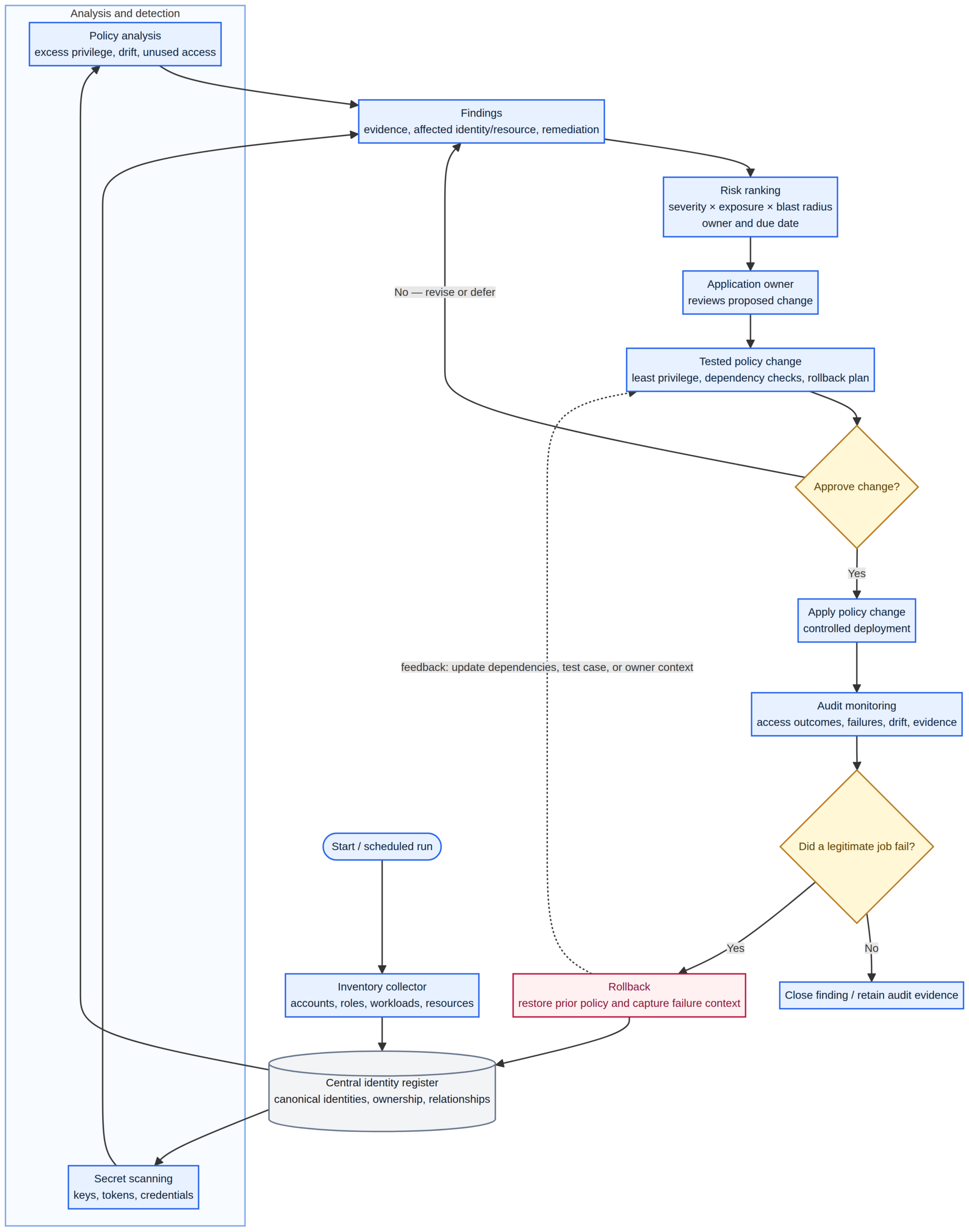
Least privilege takes work. Teams need to document permissions, run tests, review exceptions, and keep policies aligned with changing application behaviour. A permission change can break a job that runs once per quarter, and an overly aggressive rollout can cause an avoidable outage.
That cost is real, but it can be managed. Start with high-risk identities; generate a proposed policy from observed activity; ask the application owner to confirm infrequent tasks; test in a staging environment; roll out in stages; and keep a rollback plan. Set a review date for exceptions instead of letting them become permanent.
Policy tools can reduce guesswork, but they cannot infer business intent. Logs show what a workload did during a period, not everything it may legitimately need to do. Human review remains part of the control.
A practical six-step remediation sequence
- Inventory workload identities. Include service accounts, application registrations, managed identities, API credentials, and CI/CD roles. Record owner, purpose, environment, resources, and credential method.
- Identify dangerous authority. Prioritise identities that can modify IAM, impersonate other identities, access secrets, alter production resources, or read sensitive datasets.
- Examine credential issuance. Look for exposed or long-lived secrets, shared credentials, broad federation trust, and applications that let untrusted code use privileged identities.
- Compare access with observed use. Use provider tools and audit logs, while accounting for monthly, quarterly, recovery, and incident-response tasks.
- Reduce permissions as code. Make a reviewed change, test expected functions, monitor errors, and retain a rollback path. Do not restore unrestricted access as the default response to the first failure.
- Repeat and alert. Revisit access after application changes and new integrations. Alert on sensitive permission grants, key creation, trust-policy changes, and anomalous data access. Disable identities when their purpose ends.
The question every application owner should answer
When reviewing a cloud application, do not stop at whether it authenticates successfully or whether its deployment works. Ask what the application can do after an attacker takes control of its code or credentials.
Could it read unrelated customer records? Delete backups? Modify IAM roles? Obtain another service account’s credentials? Reach production from a development environment?
If the answers reveal authority that the application does not need, reduce the permissions and test the change.
Human accounts and machine identities serve different purposes, and their access controls need not look identical. A well-designed system gives each identity the smallest set of permissions that supports its job, restricts who can use it, and records what it does.
The practical test is simple: not how much authority a service could use, but how much it actually needs—and how quickly the organisation could contain it if the service were compromised.