Compromised credentials were an initial access vector in 22% of breaches reviewed in Verizon’s 2025 Data Breach Investigations Report. The same research found that, among users whose devices were infected with infostealer malware, only 49% of their passwords were distinct from one another in the median case.
That second figure explains why a leaked password can become a much bigger problem than the breach notification suggests. An attacker may not care much about the old website where the password was stolen. They may care about whether the same credential opens your email, cloud storage, social media account, work account or financial service.
So if you have received a warning that your password appeared in a data breach, do not treat it as a routine password-reset chore. Treat it as a small security incident.
Your goal is bigger than creating a new password. You need to break every realistic route an attacker could use to turn the exposed credential into access.
First, verify that the breach warning is real
A message about a data breach can itself be a phishing attempt.
If an unexpected email says your password was exposed and gives you a link to “secure your account,” do not use that link. Open the service yourself through its official website or app.
You can type the address manually, use a bookmark you already trust, or open the official mobile application. Then look for security alerts, breach notifications or account-security information.
An attacker does not need to know your current password to make a convincing scam. Knowing that you use a particular service can be enough to build a credible-looking “security alert.”
What does “password exposed” mean?
The phrase is often used loosely. A breach might expose an email address and password combination, a password hash, recovery information, session credentials or application access. Those situations are related, but they are not identical.
| Possible exposure | What it means for you | Immediate response |
|---|---|---|
| Email address or username | Attackers may use it for phishing or login attempts. | Expect more targeted messages and monitor sign-in alerts. |
| Password hash | The password may still be recoverable through offline guessing, depending on the password and how it was protected. | Replace the password anyway. |
| Email and password pair | The credential can be tested against other services. | Change the password everywhere it was reused. |
| Recovery email or phone | Password-reset and recovery attacks become easier to attempt. | Review and correct recovery settings. |
| Recovery codes | An attacker may have another route through MFA recovery. | Generate a new set of codes. |
| Session cookie or token | An attacker may already have an authenticated session. | Terminate existing sessions and investigate account activity. |
| Third-party application access | An authorised application may retain access through a token. | Revoke the application or token. |
Modern authentication systems are expected to protect stored passwords using salted password hashing and other controls.
From the user’s side, however, there is no useful prize for guessing whether the breached company used an excellent hashing scheme. Once you are told that a password has been compromised, stop using it.
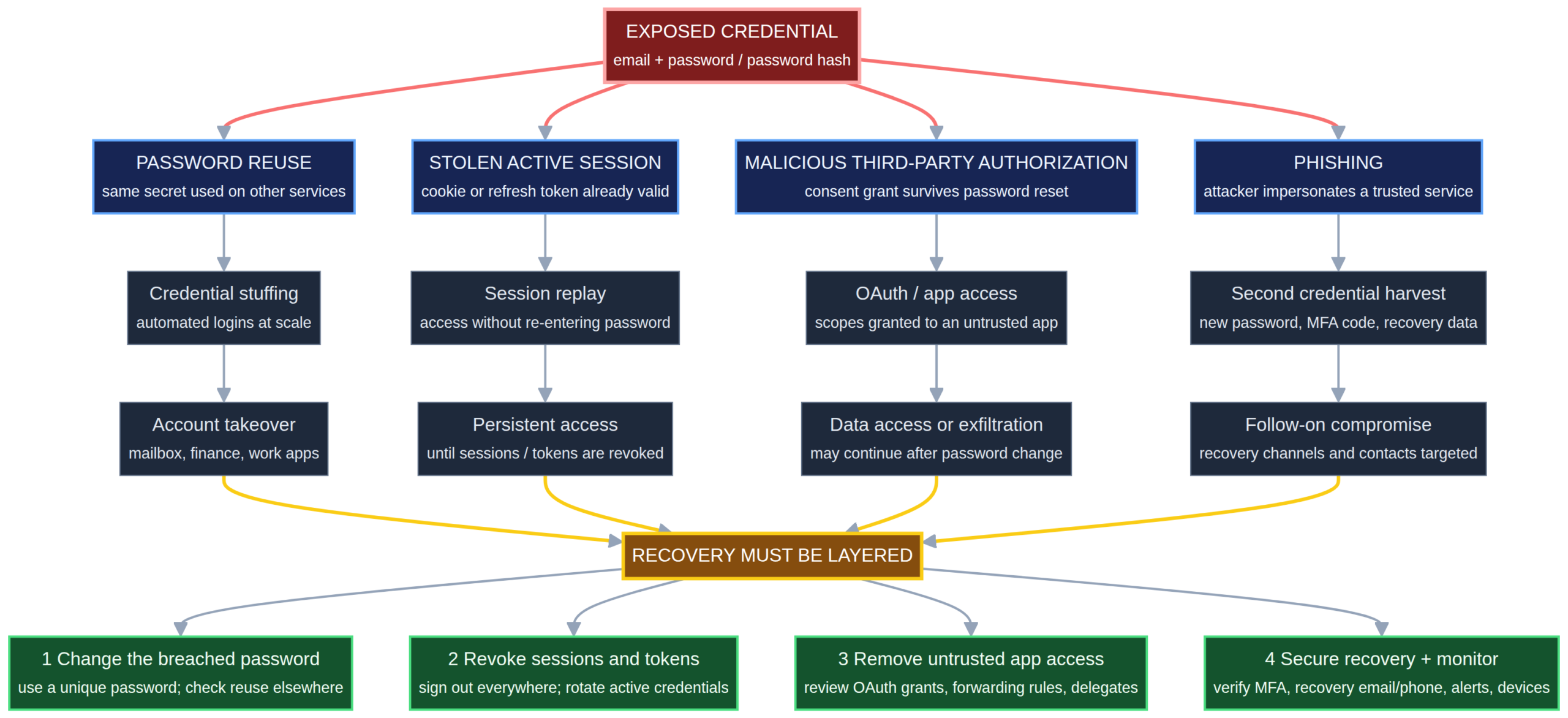
The diagram above shows why recovering a breached account requires more than changing the password. Attackers may exploit reused credentials, active sessions, malicious apps or phishing, so recovery should also revoke access, secure recovery methods and monitor the account.
Change the exposed password
Go directly to the affected service and replace the password.
The new password should be genuinely different. Do not turn BlueCarpet2025! into BlueCarpet2026! and assume the problem has been solved.
NIST’s current guidance says passwords are not phishing-resistant and recommends blocking commonly used or compromised passwords. For passwords used as a single authentication factor, its guidance requires services to support passwords of at least 15 characters.
For most people, a password manager is the easiest way to handle this. Let it generate a long, random password and save it for you rather than trying to invent another memorable variation of the old one.
Hunt down password reuse
This is the step that turns a single-site breach into a wider account-security problem.
Suppose an old shopping website is breached. The exposed password is also used for Gmail, Facebook and a Microsoft account. The attacker now has several targets even though only one company was breached.
This is known as credential stuffing. Attackers take stolen username-and-password combinations and automate login attempts against other services. OWASP describes credential stuffing as a major reason password reuse is dangerous.
Do not search only for exact duplicates. If your usual habit is to keep a base password and change the number or punctuation for each site, assume those predictable variants are compromised too.
I would work through accounts in roughly this order:
- Primary email
- Banking, payment and financial accounts
- Google, Apple or Microsoft account
- Password manager
- Cloud storage and work accounts
- Social media
- Shopping and other important services
Your primary email comes first because it can be used to reset passwords for many other accounts. Nigeria’s ngCERT warned that stolen email credentials can be used for credential stuffing, account takeovers, identity theft and follow-on attacks.
Secure your email like it is the control room
If your email password appeared in a breach, slow down here. Do a deeper inspection than you would for an ordinary account.
Changing the email password is the obvious part. The less obvious part is checking whether someone has quietly changed the way your mailbox behaves.
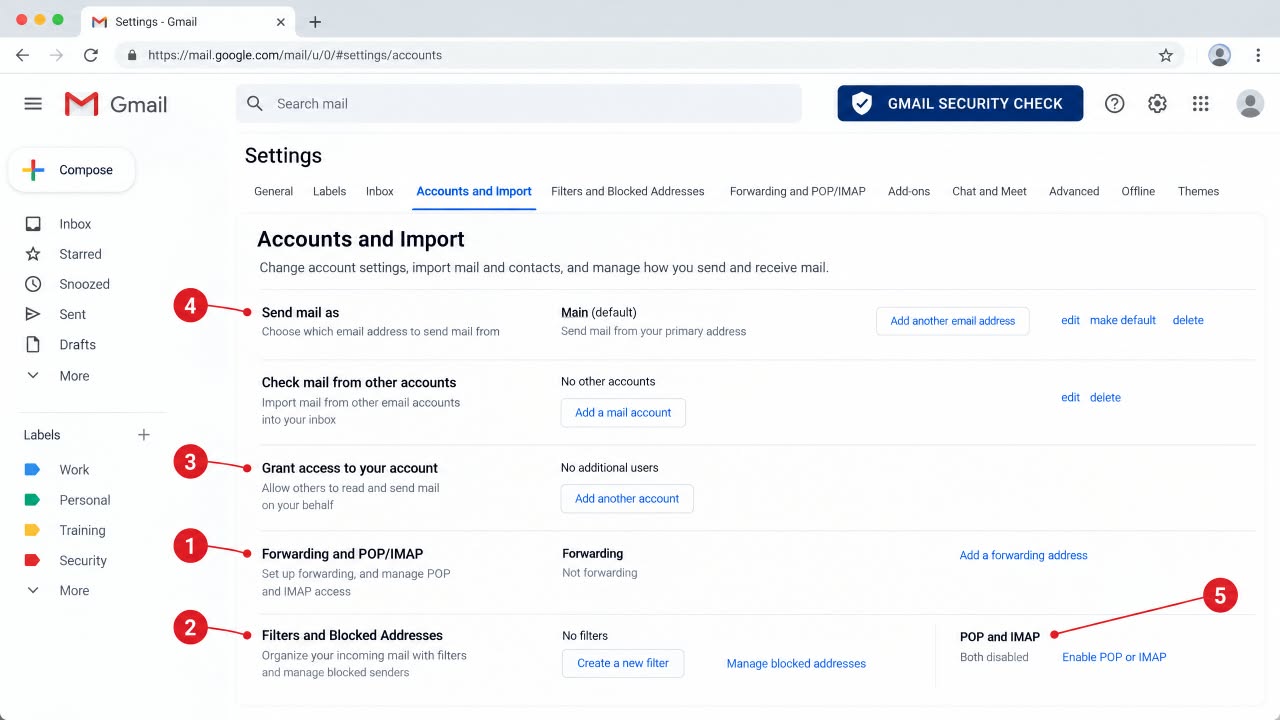
Attackers can use forwarding rules, filters, delegates and other account settings to keep access or hide evidence.
For Gmail, Google specifically recommends checking Gmail security settings, including:
- “Send mail as” addresses
- Delegated account access
- POP access
- Forwarding addresses
- Filters that automatically forward or delete messages
- Vacation or automatic replies
Google notes that some of these settings need to be checked in Gmail through a web browser rather than the mobile app.
For Outlook and Microsoft accounts, Microsoft’s account-recovery guidance tells users to review connected accounts, forwarding and automatic replies after a compromise.
These checks are easy to skip because nothing visibly looks wrong. That is exactly why they are useful.
Imagine an attacker has created a filter that automatically moves messages containing “password reset,” “invoice” or “security alert” into a hidden folder. You can be using the account normally while missing the very messages that would tell you someone is trying to take over another account.
Sign out existing sessions
Do not assume a password change automatically removes every device already logged into your account.
Look for controls such as Sign out of all devices, Log out everywhere, Active sessions or Where you’re signed in.
The FTC recommends signing out of all devices after taking back a hacked account.
There is a technical reason for this. NIST treats an authenticated session as its own security state, using a session secret that can persist independently of the original login event. Its current guidance discusses session cookies, mobile-app sessions and access tokens separately from passwords.
An attacker who already has a valid session is in a different position from someone who merely knows your old password.
Check the device list carefully. A city or location that looks unfamiliar is worth investigating, but do not treat geolocation as perfect evidence. Mobile networks, VPNs and carrier routing can make locations look odd.
Turn on the strongest MFA available
MFA is one of the best ways to reduce the damage from a stolen password, but saying “use 2FA” without discussing the method leaves out an important detail.
CISA recommends MFA because a stolen password alone may no longer be enough to enter the account.
For high-value accounts, prefer a passkey or another phishing-resistant FIDO method when available. An authenticator app is a strong alternative. SMS codes provide another layer, but they are not the strongest option available.
NIST states plainly that passwords are not phishing-resistant. That is one reason moving important accounts toward passkeys or hardware-backed authentication makes sense.
Also inspect your backup methods. Adding an authenticator app does not automatically mean weaker recovery routes have disappeared.
Replace recovery codes and check recovery settings
Open the account’s security and recovery section. Check the recovery email address, phone number, backup methods, security keys, trusted devices and recovery codes.
If you suspect that recovery codes were exposed, replace them.
Do not assume the attacker needs your main password forever. If they have modified your recovery configuration, they may try to use that route later.
Google’s Security Checkup guidance specifically recommends reviewing recovery options, connected devices and account-security recommendations after suspicious activity.
Check app passwords and legacy access
Some services have authentication mechanisms that sit outside the normal password box.
Google, for example, supports app passwords for some older apps and devices when 2-Step Verification is enabled. Google says these are separate 16-character credentials and recommends using newer authentication methods such as “Sign in with Google” where available.
Google also says its app passwords are revoked when the main Google Account password is changed. That behaviour should not be assumed for every platform, though. Other services can handle API keys, app-specific passwords or device credentials differently.
So check the affected account for:
- App passwords
- API keys
- Personal access tokens
- Connected devices
- Legacy mail clients
- Other authentication credentials
Remove anything you do not recognise or no longer need.
For Google users, the official app-password guidance explains when these credentials exist and how to revoke them.
Revoke suspicious third-party applications
This deserves its own step because it is one of the easiest ways to misunderstand account recovery.
A third-party application can receive permission to access your account without receiving your actual password.
In a September 1, 2026 advisory, the FBI’s Internet Crime Complaint Center warned about OAuth consent phishing. In the type of attack described by the FBI, a victim is tricked into approving a malicious application. The attacker then receives an authorization token that can provide persistent access to data or services.
The FBI makes the uncomfortable point very clearly: changing the password does not necessarily revoke this kind of access. The malicious application or token has to be removed through the account’s security controls.
So open the account’s connected-apps or third-party-access page and review every entry.
Ask a simple question about each one: Did I deliberately give this application access?
If the answer is no, revoke it.
Be particularly careful with applications that can read email, send messages, access cloud files or manage account information.
Check recent account activity
Now look backward. Check recent sign-ins, password changes, security alerts, sent messages, account-setting changes, new devices and purchases.
You are trying to answer three questions:
- Did someone actually access the account?
- What did they change?
- Could they have used this account to reach another one?
Do not panic over a strange-looking IP address by itself. Mobile carriers, corporate networks and VPNs can make login locations appear misleading. Look for combinations of evidence: unfamiliar device, unfamiliar time, unfamiliar action and a security alert you did not trigger.
Use breach-checking tools carefully
Have I Been Pwned is useful for checking whether an email address appears in known breach data.
Its Pwned Passwords service can also check whether a password has appeared in known compromises. It uses k-anonymity: the service does not receive your full password or complete password hash. The password is hashed locally, and only the first five characters of the hash are sent for the lookup.
You can see the technical explanation in the service’s Pwned Passwords documentation.
There is a limit, though: a clean result does not prove that your credentials have never been exposed. It means the information was not found in that particular dataset.
And never enter a valuable current password into a random “dark web checker” you found in an advertisement or social-media post. A security tool that requires you to hand over the secret you are trying to protect deserves immediate suspicion.
Secure the password manager itself
A password manager changes the economics of password reuse, but it becomes a high-value account in its own right.
If your password manager is compromised, the attacker may get access to many credentials at once.
Protect it with a unique master password or passphrase and MFA where supported. Review the devices currently signed into the vault and remove anything unfamiliar.
Pay attention to recovery information as well. A recovery code stored only inside an email account that is currently compromised is a poor recovery plan.
Keep a recovery kit somewhere you control and can access independently of the affected account. Exactly what belongs in that kit depends on the password manager you use, so follow that provider’s current recovery procedure rather than copying a generic recipe from another service.
You should also avoid putting all your recovery eggs in one basket. Your primary email, password manager and major identity-provider account should not quietly depend on the same weak credential.
Consider the possibility that your device was compromised
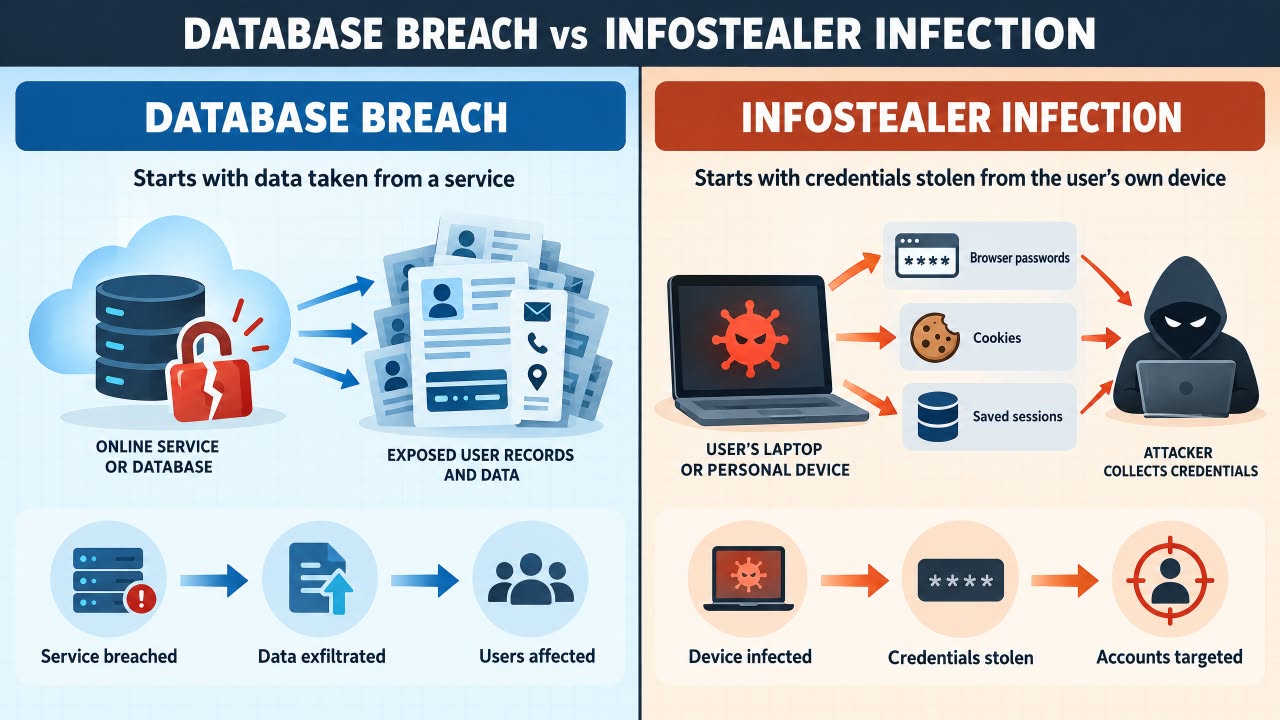
Not every stolen password comes from a company’s database.
Infostealer malware can steal credentials from browsers and other software on the device itself. Verizon’s 2025 research found extensive password reuse among users whose devices appeared in infostealer data.
That changes the recovery strategy.
If you have reason to believe malware stole the password, repeatedly changing passwords from the same potentially infected device is a bad recovery loop. The new password could simply be stolen again.
Microsoft takes this approach in its own compromised-account recovery process: its guidance tells users to scan the PC for malware before changing the password.
Update the operating system and security software, perform a thorough scan and remove malicious software where possible. If the device is seriously compromised, rebuilding it may be the cleaner option.
Then reset important credentials from a device you trust.
Watch for phishing after the breach
Once your email address appears in a breach, expect the possibility of follow-up attacks.
You may receive messages claiming that your account needs verification, your payment failed, your password must be reset, or you need to confirm an unusual transaction.
The attacker may know which service you use, which makes the message more convincing.
Keep one rule in place: do not use an unexpected message as your route into a sensitive account.
Open the service yourself. This also applies to messages asking for one-time codes. Treat an authentication code like a password. If you did not initiate the login, do not give the code to anyone.
Take financial exposure seriously
A leaked username and password is serious. A breach involving banking information, payment details or identity documents requires a wider response.
Watch your bank and payment accounts for transactions or account changes you did not authorise.
In Nigeria, the Central Bank of Nigeria advises customers to contact their financial institution promptly when they suspect fraud or compromised banking information.
Do not send your PIN, password or full authentication credentials to someone claiming to be helping with the investigation. The CBN’s complaint guidance specifically warns consumers not to include PINs and passwords in complaints.
Save evidence before deleting anything:
- Suspicious emails and messages
- Login alerts
- Transaction references
- Screenshots
- Suspicious URLs
- Dates and times
- Details of devices or applications you did not recognise
Where to report a cyber incident in Nigeria
A compromised password does not always require a police report. If there is evidence of account takeover, financial loss, identity theft or a serious cybercrime, reporting can become appropriate.
Nigeria’s NPF National Cybercrime Centre has an e-Reporting portal for submitting cybercrime reports and supporting evidence.
If your bank is involved, report the problem to the bank first. The CBN’s complaints process says customers should first lodge complaints with the financial institution concerned. Where a complaint remains unresolved within the applicable timeframe, it can be escalated to the CBN Consumer Protection Department.
For economic or financial crimes, the EFCC provides official petition channels.
The right reporting route depends on what actually happened. A leaked password is not automatically an EFCC case, just as a fraudulent bank transaction should not be treated as a simple password problem.
What if you are already locked out?
If the attacker has already changed the password or recovery information, stop trying random fixes.
Use the service’s official account-recovery process. Avoid people on social media who claim they can “recover” hacked accounts for a fee.
After you regain access, immediately:
- Change the password.
- Terminate unfamiliar sessions.
- Restore your recovery email and phone.
- Enable strong MFA.
- Replace recovery codes.
- Remove unknown applications.
- Check forwarding, filters and delegated access if it is an email account.
- Review recent activity.
What you should not do after a password breach
- Do not keep using the exposed password because the breached website is “not important.”
- Do not make a tiny variation and call it a new password.
- Do not click an unexpected password-reset link simply because the message mentions a real breach.
- Do not stop at the password change. Review sessions, recovery settings and connected applications.
- Do not assume all MFA methods offer the same protection.
- Do not ignore your primary email.
- Do not assume a clean breach-check result proves that you were never exposed.
- Do not continue resetting credentials from a potentially infected device.
How to make the next breach less painful
You cannot control the security of every website where you create an account. You can control how much damage one stolen credential can cause.
Use a password manager and give important accounts unique passwords.
Do not become obsessed with changing every password every few weeks just because a calendar says so. Change a password when there is evidence of compromise or another concrete reason to do it.
For important accounts, prefer passkeys or phishing-resistant authentication when the service offers them. Turn on security alerts. Review connected applications occasionally.
And know where your account’s recovery controls live before something goes wrong. Recovery is much easier when you are not discovering the settings for the first time during an incident.
A practical 15-minute breach response
Picture a normal evening. You receive a legitimate alert saying that an old service has exposed your email and password.
You do not need to spend the entire night investigating dark-web forums.
Start with the high-value actions:
- Minute 1–3: Open the affected service directly and change the password.
- Minute 3–6: Change that credential anywhere it was reused.
- Minute 6–8: Secure your primary email and inspect recent sign-ins.
- Minute 8–10: Sign out other sessions and remove unknown devices.
- Minute 10–12: Enable the strongest available MFA.
- Minute 12–15: Check recovery settings and connected applications.
After that first pass, investigate the less obvious issues: forwarding rules, filters, delegates, app passwords, OAuth tokens, malware and financial exposure.
The point is not to turn every breach notification into a forensic investigation. It is to close the high-value doors first.
The response checklist
- Verify that the breach notification is genuine.
- Change the exposed password.
- Change every reused or predictable variant.
- Secure the primary email account.
- Sign out existing sessions.
- Remove unfamiliar devices.
- Enable strong MFA.
- Replace exposed recovery codes.
- Check recovery email and phone numbers.
- Inspect email forwarding and filters.
- Check delegated mailbox access.
- Review app passwords and other legacy credentials.
- Revoke suspicious third-party applications and OAuth access.
- Review recent account activity.
- Check for malware if the device may have been the source of the theft.
- Monitor financial accounts when financial information was exposed.
- Preserve evidence and report serious incidents through the appropriate Nigerian channel.
Final word
A password appearing in a breach does not automatically mean your entire digital life has been taken over.
But it does mean you should stop assuming the old credential is private. The dangerous mistake is to change one password, see the confirmation screen, and move on.
Attackers can test reused credentials against other services. They can exploit active sessions. They can alter recovery settings. They can add mailbox forwarding rules. They can abuse third-party permissions. And, in some cases, they can steal the replacement password from an infected device.
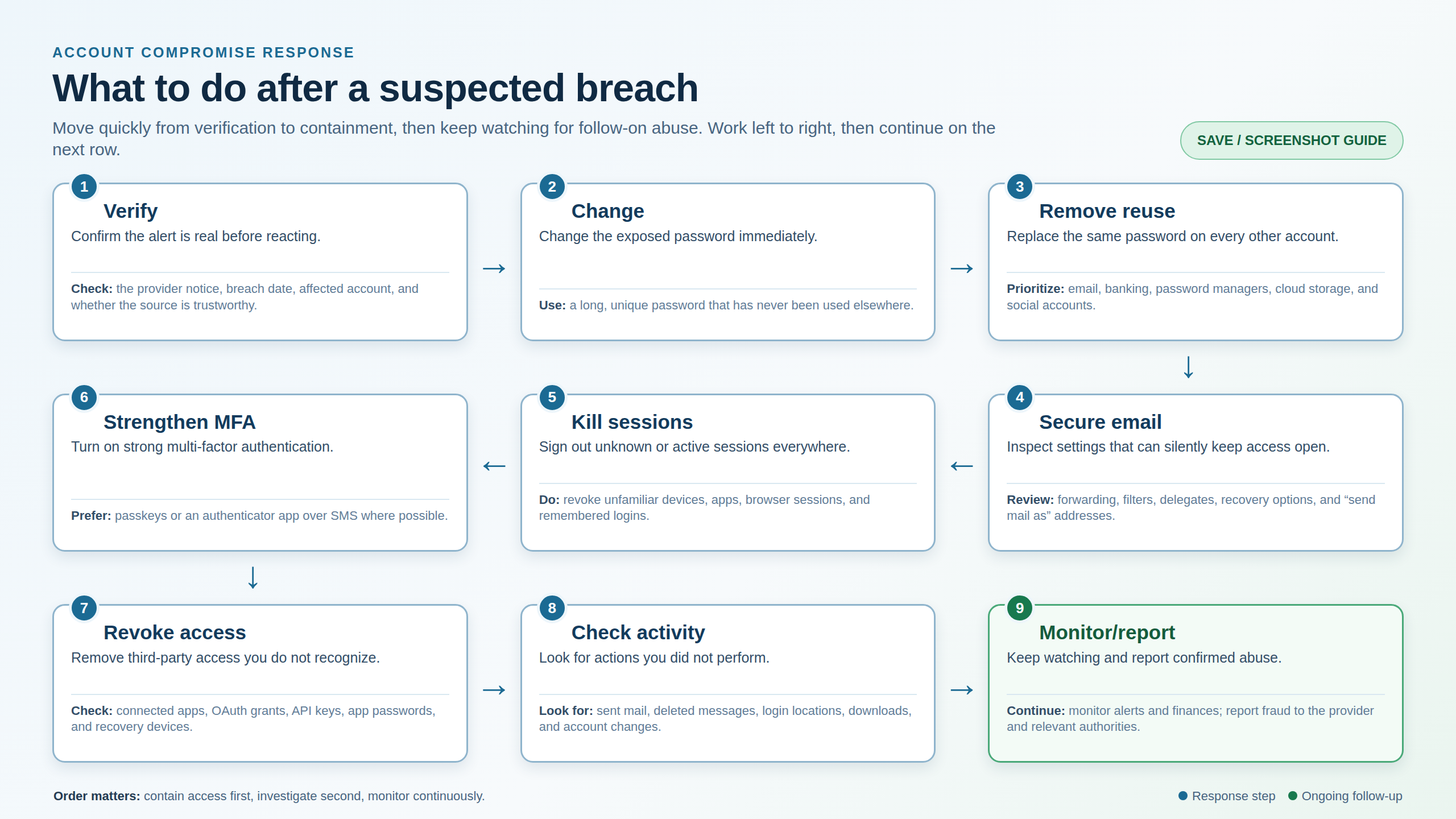
That is why the right response is a sequence rather than a single action.
Replace the credential. Remove reuse. Secure your email. Kill existing sessions. Strengthen authentication. Remove unwanted access. Check what happened.
Once you approach a breach that way, the notification becomes much less mysterious. It tells you where to start, not where the investigation ends.
References for Further Reading
- NIST SP 800-63B: Digital Identity Guidelines
- CISA: Turn On MFA
- FTC: How to Recover a Hacked Email or Social Media Account
- OWASP: Credential Stuffing
- Have I Been Pwned: Pwned Passwords
- FBI IC3: OAuth Consent Phishing Advisory, September 1, 2026
- ngCERT: Risks of Stolen Email Passwords and Credentials, June 15, 2026
- Central Bank of Nigeria: Fraud and Scam Guidance
- NPF National Cybercrime Centre: e-Reporting Portal