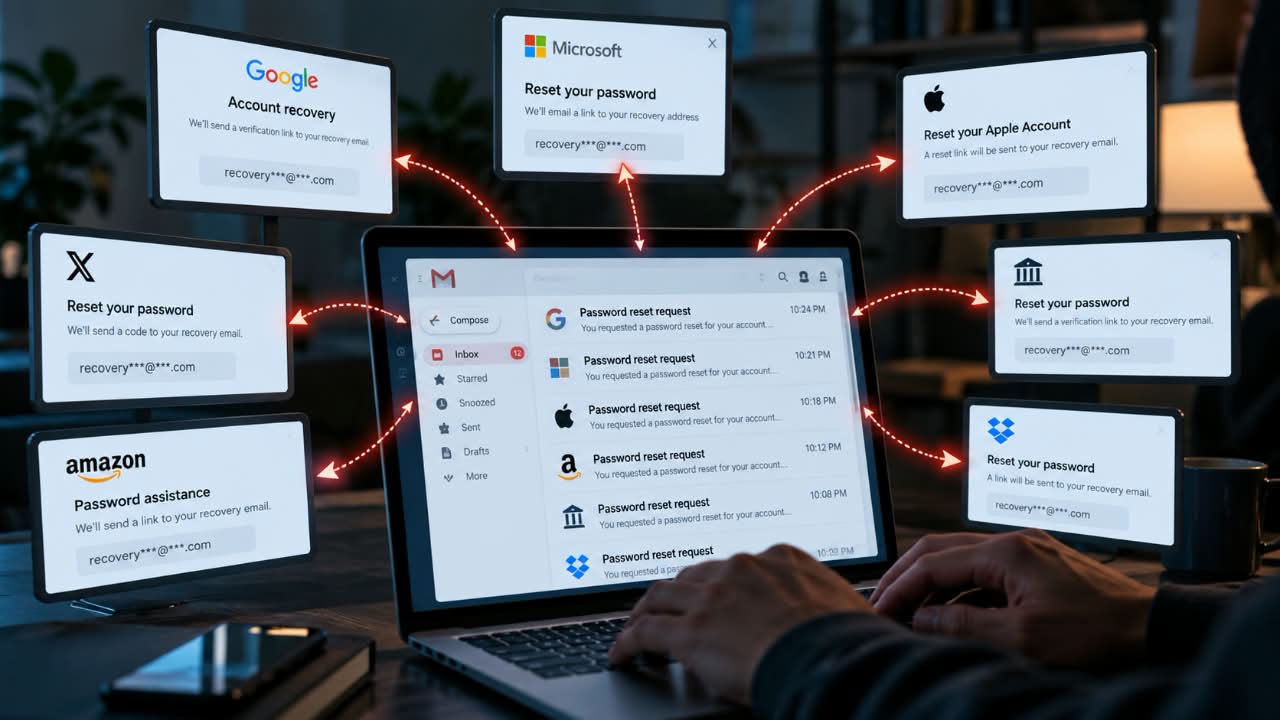
One compromised email account can become the starting point for much more than email theft. In a 2019 study of more than 350,000 real-world account-hijacking attempts, Google researchers found that device-based challenges blocked more than 94% of phishing-based hijacking attempts and 100% of automated attempts in the study.
The research did not examine recovery-email reuse specifically, but it demonstrated how much the checks around login and recovery can influence whether an attacker gets through.
That raises a less obvious account-security question: what happens if an attacker gets control of the email address you use to recover several other accounts?
Using the same recovery email for multiple services is not automatically unsafe. The risk depends on three things: how many important accounts trust that inbox, how well the inbox itself is protected, and what each provider requires before allowing recovery to succeed.
I think of this as concentrated recovery authority. Five accounts can have five different passwords and still share one important dependency.
The Recovery Email is Not the Vulnerability by Itself
Password reuse and recovery-email reuse create different problems.
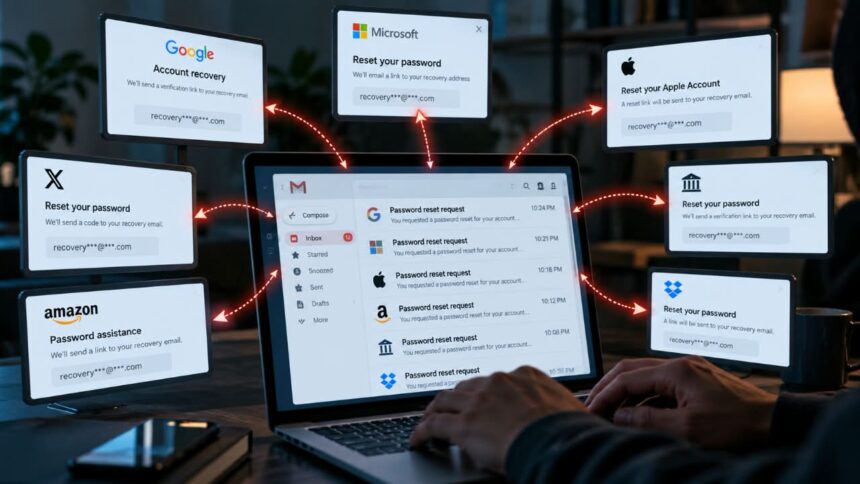
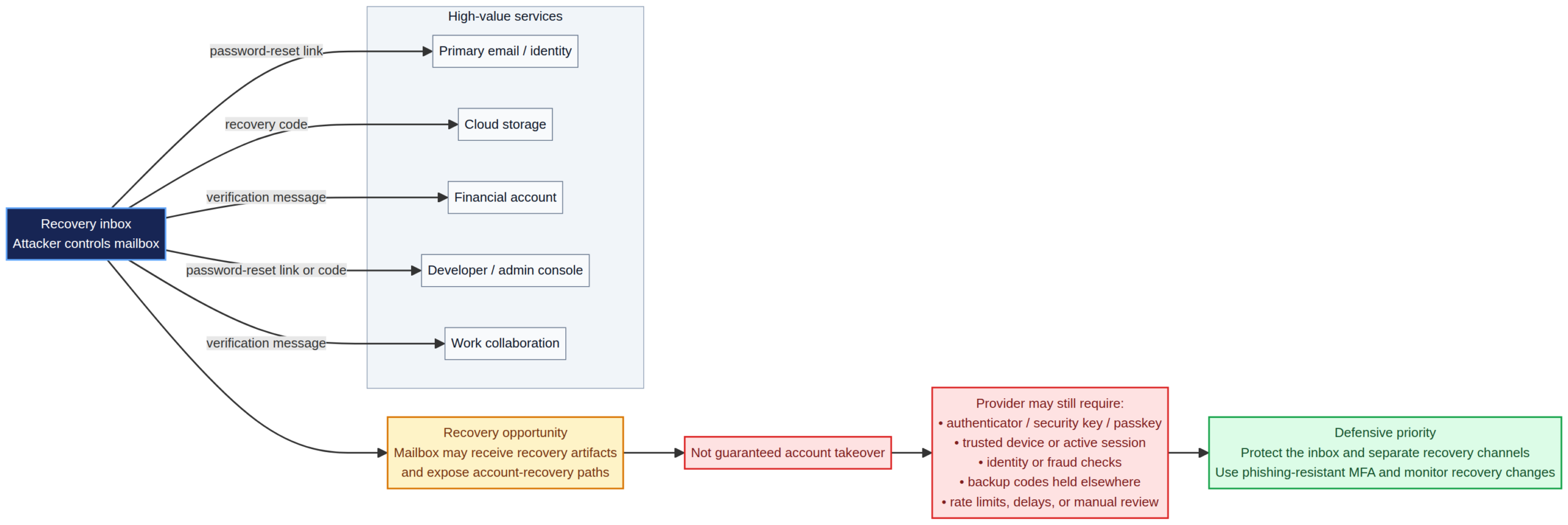
When someone reuses a password, a stolen credential can often be tested directly against another service. With a recovery address, the attacker may instead trigger the forgotten-password or account-recovery process and attempt to use whatever the service sends to that mailbox.
That does not mean an email link automatically hands over the account. A service may require another factor, recognize an unfamiliar device, impose a delay or use additional identity checks.
OWASP treats password reset as a high-risk operation and recommends controls such as single-use reset tokens, appropriate expiration, rate limiting and protection against account enumeration. It also recommends additional safeguards when a user changes the email address associated with an account.
So the useful question is not, “Do I reuse this recovery email?” It is:
How much authority does that recovery address actually have?
Google, Microsoft and Apple Do Not Recover Accounts in Exactly the Same Way
Provider-specific details make this clear.
| Provider | Current recovery options | Security implication |
|---|---|---|
| Recovery email and phone, backup codes, passkeys, security keys and other account-recovery methods | A recovery email is one component of a broader recovery system. Google may continue offering verification to previous recovery information for up to seven days after certain recovery or authentication changes. | |
| Microsoft | Recovery email, Microsoft Authenticator, passkeys and a separate 25-digit recovery code | Microsoft supports several verification paths. Its recovery code provides another way to regain access when normal verification methods are unavailable. |
| Apple | Trusted devices, trusted phone numbers, recovery contacts and optional recovery keys | A recovery contact does not receive account access; they can provide a six-digit recovery code during account recovery. Apple’s optional recovery key creates a stricter recovery process. |
Google recommends a recovery email that is used regularly and is different from the address used to sign in. It also supports backup codes and passkeys as additional ways to authenticate or recover access.
Microsoft supports multiple verification methods, including an authenticator app, recovery email and passkeys. It also provides a 25-digit recovery code.
Apple’s model differs again. A recovery contact can help generate a six-digit code without receiving access to the account. Apple also supports an optional 28-character recovery key.
The practical lesson here is: the consequences of losing a recovery inbox depend on what the provider accepts as proof of ownership.
Where Recovery Dependencies Become Dangerous
Suppose your main email account, cloud storage and social account all use the same secondary mailbox for recovery.
If that secondary mailbox is compromised, an attacker can potentially initiate recovery against all three accounts. Whether any attempt succeeds depends on the individual provider’s controls.
Now add another dependency: the secondary mailbox itself can be recovered through a third account.
That creates a chain:
Account C → Recovery Inbox B → Account A
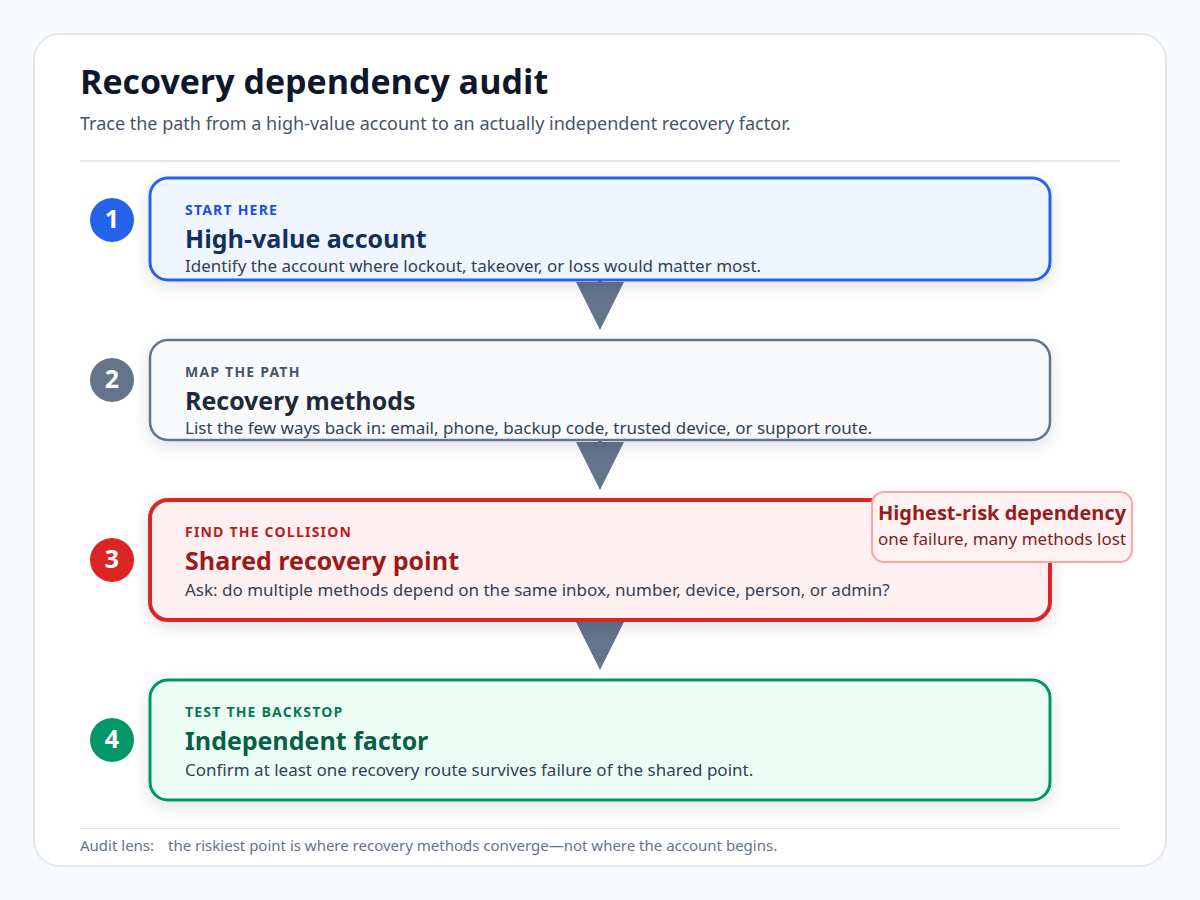
The useful security question is whether the chain eventually reaches an independent factor, such as a passkey, security key, recovery code or trusted device, rather than another account controlled through the same chain.
This is why I pay particular attention to fan-out: how many important accounts depend on the same recovery point. A relatively empty mailbox can be a high-value security asset if several important services trust it.
Mat Honan’s 2012 Hack Illustrates the Dependency Problem
One of the most cited historical examples is journalist Mat Honan’s 2012 account compromise.
The attackers exploited weaknesses involving Apple’s and Amazon’s customer-support and recovery processes before gaining access to Honan’s Apple account. That compromise helped them reach his Gmail account and subsequently his Twitter account. Honan later described the incident in Wired.
It would be inaccurate to summarize the incident as “reused recovery email caused the hack.” Social engineering, provider procedures and information available to the attackers all played a role.
What’s important to note is that: once one trusted account falls, the relationships around it can create additional attack paths.
The Forgotten Recovery Inbox May be the Weak Link
People often protect the email account they use every day while neglecting the account they entered as a recovery address years ago.
Imagine an old mailbox with a password that has appeared in a breach, no MFA and several years of untouched security settings. It might contain little of value. But if five important services trust it for recovery, its security value is much higher.
Verizon’s 2025 research found compromised credentials were an initial access vector in 22% of the breaches it reviewed. It also found that, among users whose devices were infected with infostealer malware, only 49% of passwords were distinct from one service to another in the median case. These statistics concern credential abuse rather than recovery-email reuse, so they should not be presented as evidence that recovery-email reuse itself causes takeovers. They do show why important identity accounts deserve strong protection.
The same concern appears in Nigeria’s recent cyber advisories. ngCERT warned on June 15, 2026 about stolen email passwords and credentials resulting from large data breaches. On August 27, it warned about a database of compromised email credentials advertised on an underground forum, linking the exposure to risks including credential stuffing and account takeover.
Neither source measures recovery-email reuse. Their relevance is narrower: a compromised email account can provide an initial foothold, while the recovery privileges attached to it determine what an attacker can try next.
Passkeys and Recovery Codes Can Reduce Dependence on Email
The answer is not to create twenty email addresses and hope that complexity equals security.
Passkeys use cryptographic credentials associated with a device or credential manager rather than a password that can simply be entered into a phishing site. Google describes passkeys as more resistant to phishing than passwords. CISA recommends phishing-resistant authentication based on FIDO/WebAuthn, including security keys and platform authenticators.
Backup codes provide another route when the normal second factor is unavailable. Google, for example, issues one-time backup codes that can be stored securely offline.
Recovery contacts and recovery keys can move part of the recovery process away from email. Apple supports both, while Microsoft provides a separate recovery code.
NIST’s current digital-identity guidance recognizes saved recovery codes, issued recovery codes, recovery contacts and repeated identity proofing as recovery approaches. For issued recovery codes sent by email, NIST specifies a validity period of no more than 24 hours and requires newly established recovery addresses to be verified.
How to Audit Your Recovery Architecture
Start with the accounts whose compromise would have the widest consequences.
- List the recovery methods. Record recovery emails, phone numbers, trusted devices, recovery contacts, backup codes, passkeys and security keys.
- Find the high-fan-out accounts. Identify the inboxes that can help recover the greatest number of important services.
- Protect those accounts independently. Use a unique password and the strongest authentication method available.
- Look for loops. Check whether A can recover B while B can recover A.
- Inspect the actual reset flow. Find out whether an email link alone can complete recovery or whether another factor is required.
- Store recovery material outside the account. Keep backup codes or recovery keys somewhere safe and accessible if the account itself is unavailable.
- Review recovery settings after a compromise. Change the password, remove unfamiliar sessions and devices, inspect forwarding rules and third-party access, and verify recovery information has not been altered.
A useful test is to imagine that your main recovery inbox suddenly disappears.
Which important accounts would you struggle to recover?
Those are the dependencies worth fixing first.
Changing the Recovery Path Can be as Important as Changing the Password
After a compromise, changing the password is only part of the cleanup.
An attacker may have added a recovery email, changed a phone number or registered another authentication method. If those settings are left untouched, the attacker may retain a route back into the account.
Google says that after certain recovery or authentication changes, it may continue offering verification codes to previous recovery information for seven days.
OWASP likewise recommends treating email-address changes as sensitive operations, with controls such as reauthentication and notification of the existing address.
So, Should You Use a Different Recovery Email for Every Account?
Not necessarily.
Creating a separate mailbox for every service can make recovery harder to manage. You can end up with forgotten addresses, lost credentials and a system that becomes difficult to reconstruct during an emergency.
The better objective is to reduce unnecessary concentration and strengthen the accounts that sit at the center of your recovery system.
For your primary email, password manager, business accounts and financial services, look closely at what happens after you forget the password. If the provider supports passkeys, security keys, recovery codes, trusted devices or strong recovery delays, consider using those mechanisms rather than relying entirely on email.
What the Evidence Supports
There is no strong published dataset showing how often reused recovery email addresses specifically lead to successful account takeover.
The available evidence supports narrower conclusions:
- Account recovery is a security-sensitive process with its own attack surface.
- Compromised email credentials are actively abused and can provide an initial foothold.
- Passkeys and other phishing-resistant authentication methods can provide stronger protection against phishing than passwords and weaker MFA methods.
- Major providers use different recovery mechanisms, so the consequences of losing a recovery mailbox depend heavily on the service.
That is enough reason to audit recovery dependencies. It is not enough to claim that reusing a recovery email is, by itself, a major standalone attack vector.
The takeaway
Account security is easy to audit from the login screen and surprisingly easy to overlook from the recovery side.
Look at which accounts can recover which others. Find the recovery points with the greatest fan-out. Protect them with strong, independent authentication and keep offline recovery material somewhere safe.
You do not need a different email address for everything. You need to know where your recovery authority is concentrated and whether an independent factor can break the chain.
That is the part of account security worth auditing.
Sources and further reading
- Google Research: Evaluating Login Challenges as a Defense Against Account Takeover
- Google Account Help: Set Up Recovery Options
- Google Account Help: Backup Codes
- Google Account Help: Passkeys
- Microsoft Support: Security Info and Verification Codes
- Microsoft Support: Microsoft Account Recovery Code
- Apple Support: Account Recovery Contacts
- Apple Support: Recovery Key
- NIST SP 800-63B: Authentication and Lifecycle Management
- OWASP: Forgot Password Cheat Sheet
- OWASP: Email Validation and Verification Cheat Sheet
- CISA: Implementing Phishing-Resistant MFA
- Verizon: 2025 Research on Credential Abuse and Credential Stuffing