

Google Analytics no longer uses “conversion” as a catch-all term. Today, an important action is a key event in GA4, while a Google Ads conversion is the advertising action built from measurement data. That distinction is a small clue to a much bigger problem: conversion tracking has become a data architecture problem, not just a tag-management task.
When a business sends the same purchase to GA4, Google Ads, Meta, TikTok and LinkedIn, the platforms do not expect the same payload. They use different names, identifiers, matching fields and delivery rules.
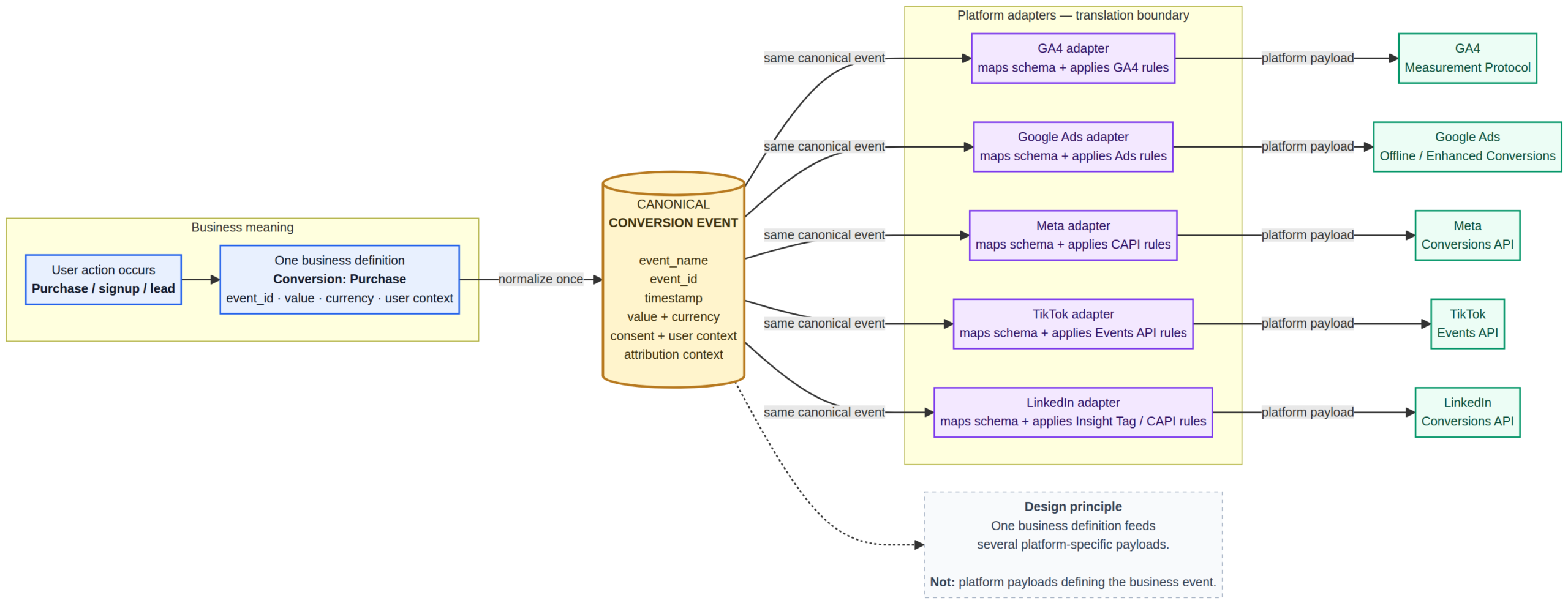
The clean solution is to build a canonical conversion event schema first, then translate that event for each destination. I have found this approach much easier to reason about because the business definition stays stable even when an advertising platform changes its API.
This guide walks through that architecture, the fields worth standardising, common implementation mistakes, and a practical example you can adapt to a real website or application.
What Is a Conversion Event Schema?
A conversion event schema describes the structure and meaning of an event that represents an important business action.
Think about a completed purchase. You might call the event:
{
  "event_name": "purchase_completed"
}
That tells you almost nothing. A useful schema should also define the event’s identity, timestamp, value, currency, transaction reference, customer context, attribution data, consent state and destination rules.
This is closely related to the tracking-plan approach used by analytics platforms. Amplitude describes tracking plans as specifications for events and properties, while Segment treats the tracking plan as a shared definition of the data an organisation intends to collect.
The key difference is that a modern conversion schema should be more than documentation. It should be precise enough to validate and route real events.
Why One Platform Should Not Define Your Schema
Suppose your site records a successful order.
GA4 may expect purchase. Meta’s Conversions API has its own event envelope and uses fields such as event_name, event_time, event_id and custom_data. TikTok has a different event model, while LinkedIn’s Conversions API uses fields including conversion, conversionHappenedAt, conversionValue and eventId.
If you make one vendor’s payload your master schema, your internal analytics model becomes tightly coupled to that vendor.
A better architecture is:
Business action
      ↓
Canonical event
      ↓
Validation + privacy rules
      ↓
Platform adapters
   ┌────┼────┬────┐
  GA4  Ads  Meta TikTok
             ↓
          LinkedIn
The business event stays the same. The delivery format changes.
Define What Counts as a Conversion
Start with the business action, not the tracking tool.
“Button clicked” is usually an interaction. “Subscription activated” is a business outcome.
For example:
- Lead generation:
lead_submitted - SaaS:
trial_startedorsubscription_started - Ecommerce:
purchase_completed - Marketplace:
booking_confirmed
The trigger should be tied to the state you actually care about. For a purchase, a successful payment record is generally stronger evidence than a visit to a “thank you” URL.
Google’s own guidance warns against turning broad page-view activity into a key business action without defining the intended event precisely.
Give Every Event a Stable Identity
This is one of the easiest places to create silent errors.
Consider a purchase sent through both the browser and a server endpoint. Without a shared identifier, the destination may see two separate events.
{
  "event_name": "purchase_completed",
  "event_id": "purchase_ORD-10042"
}
The browser copy and server copy should refer to the same underlying event ID when the destination’s deduplication model supports it.
Do not confuse these identifiers:
event_id— identifies the specific event occurrence.transaction_id— identifies the business transaction.user_id— identifies the user or account.
Google recommends transaction_id for ecommerce purchases to help avoid duplicate purchase reporting. LinkedIn documents eventId for deduplication, while TikTok also uses event IDs in its deduplication flow.
Separate Event Names From Event Properties
Do not create a new event every time a property changes.
These are unnecessarily fragmented:
monthly_pro_subscription_started
annual_pro_subscription_started
monthly_basic_subscription_started
Use one event:
{
  "event_name": "subscription_started",
  "properties": {
    "plan": "pro",
    "billing_interval": "monthly"
  }
}
OpenTelemetry’s current event semantics also recommend event names that identify the event structure without embedding dynamic values in the name.
GA4 adds its own naming constraints. Event names are case-sensitive, have a 40-character limit and cannot use reserved names or prefixes.
Decide Which Properties Are Required
A schema becomes useful when it can reject incomplete events.
For a purchase, a reasonable internal contract could require:
event_nameevent_idoccurred_attransaction_idvaluecurrency
Optional fields might include discounts, tax, shipping, coupon codes and product metadata.
JSON Schema is useful here because it lets you formally define types, required properties, minimum values, patterns and enumerated values.
{
  "type": "object",
  "properties": {
    "value": {
      "type": "number",
      "minimum": 0
    },
    "currency": {
      "type": "string"
    }
  },
  "required": [
    "value",
    "currency"
  ]
}
Do not make every possible field mandatory. An organic visitor will not necessarily have a Google click ID. A user who declines advertising storage should not suddenly become an invalid customer because a marketing identifier is absent.
Keep Attribution Separate From the Business Event
A purchase is a business fact. UTM parameters and advertising click IDs are context around that fact.
{
  "event_name": "purchase_completed",

  "properties": {
    "value": 85000,
    "currency": "NGN"
  },

  "attribution": {
    "utm_source": "google",
    "utm_medium": "cpc",
    "utm_campaign": "spring_sale",
    "gclid": "..."
  }
}
This separation prevents your conversion definition from becoming a pile of advertising-platform fields.
Google Ads, for example, supports identifiers such as GCLID, GBRAID and WBRAID for conversion measurement. Those are valuable attribution signals, but they are not the definition of the purchase itself.
Build Consent Into the Event Pipeline
Consent should influence what data leaves your system.
Google’s current Consent Mode documentation distinguishes consent states including ad_storage, analytics_storage, ad_user_data and ad_personalization.
Your internal schema can use a simpler model:
{
  "consent": {
    "analytics": true,
    "advertising": false,
    "user_data": false
  }
}
The important part is not the exact field names. It is having enough information to decide whether an event, and which parts of that event, can be sent to a destination.
Choose the Authoritative Source
This is where tracking gets interesting.
For a marketing form, the browser may be the first place you know a lead was submitted. For a payment, your payment backend is usually a stronger source of truth. For a subscription, the billing system may be authoritative.
Document that choice.
lead_submitted
source_of_truth: web_application

payment_succeeded
source_of_truth: payment_backend

subscription_activated
source_of_truth: billing_system
That one decision can prevent a large amount of duplicate and misleading conversion data.
Use Real Event Time, Not Just Processing Time
There are several timestamps worth distinguishing:
occurred_at— when the business event happened.received_at— when your system received it.sent_at— when you transmitted it to a destination.
CloudEvents and OpenTelemetry both make a clear distinction between when an event occurred and when it was observed or processed.
This becomes important when a server retries an event later or when offline conversions arrive after the original action.
Define Conversion Value Properly
Do not send:
"value": 100without deciding what the number represents.
Does it mean gross revenue? Net revenue? Order subtotal? Estimated lead value?
For financial events, define the semantics alongside the value and currency.
{
  "value": 85000,
  "currency": "NGN"
}
Google’s ecommerce documentation uses a numeric value with a three-letter currency code and provides structured purchase and item parameters such as transaction ID, tax, shipping, coupon and items.
A Practical Canonical Conversion Schema
Here is a practical structure that works as an internal contract before you map it to a vendor.
{
  "schema_version": "1.0",
  "event_name": "purchase_completed",
  "event_id": "evt_01JXYZ123",
  "occurred_at": "2026-09-21T17:42:31Z",

  "source": {
    "platform": "web",
    "application": "storefront",
    "environment": "production"
  },

  "actor": {
    "user_id": "usr_83921",
    "anonymous_id": "anon_7f93"
  },

  "session": {
    "session_id": "sess_23892"
  },

  "properties": {
    "transaction_id": "ORDER-10042",
    "value": 85000,
    "currency": "NGN",
    "items": []
  },

  "attribution": {
    "utm_source": "google",
    "utm_medium": "cpc",
    "utm_campaign": "spring_sale",
    "gclid": "..."
  },

  "consent": {
    "analytics": true,
    "advertising": true,
    "user_data": true
  }
}
This is an internal model, not a vendor-specific API payload. That distinction gives you room to add, remove or transform fields without changing what your business means by “purchase completed”.
Map the Canonical Event to Each Platform
Now the vendor-specific work starts.
- GA4: map the canonical purchase to GA4’s
purchaseevent and ecommerce parameters. - Google Ads: map the relevant key event or conversion action and apply supported attribution and enhanced-conversion data.
- Meta: map the event into the Conversions API structure, including the appropriate user and custom data.
- TikTok: map the event into its Pixel or Events API structure and preserve the identifiers required for deduplication.
- LinkedIn: map the event into the current Conversions API schema, including the appropriate event and user-matching fields.
Validate Before You Send
A useful pipeline looks like this:
Collect
  ↓
Validate
  ↓
Check consent
  ↓
Deduplicate
  ↓
Enrich
  ↓
Map
  ↓
Send
  ↓
Log result
Analytics governance platforms already use versions of this approach. Amplitude’s current tooling can identify events and properties as valid, invalid, unexpected or out of date against a tracking plan.
That means a developer typo should be caught before it quietly contaminates your reporting.
Reconcile Conversions Against Your Source of Truth
This is the test many implementations skip.
Imagine your database records 1,000 successful orders, while analytics reports 1,087 purchases.
The APIs may still return successful responses. Your dashboards may look polished. The measurement system can still be wrong.
For critical conversions, retain enough internal metadata to trace the event across the entire pipeline:
event_idtransaction_id- processing status
- destination response
- processing timestamp
Then you can answer a much more useful question than “Did the tag fire?”:
“Can I trace this real business event from source system to every destination without duplication or ambiguity?”
Common Conversion Schema Mistakes
Using UI actions as conversions
red_button_clicked tells you about an interface. subscription_started tells you about a business outcome.
Putting dynamic IDs inside event names
Use purchase_completed with a product_id property rather than creating an event for every product. OpenTelemetry’s current naming guidance reinforces this pattern.
Making marketing identifiers mandatory
Not every visitor has every advertising identifier. A missing gclid should not make an otherwise valid purchase structurally invalid.
Counting page views as completed business events
A confirmation page can be refreshed, revisited or shared. Trigger business conversions from a sufficiently specific state whenever practical.
Letting platforms define your internal data model
Vendor APIs change. Your definition of a successful purchase should not need to change every time one of them does.
Think of the Schema as a Contract
The most useful mental model is not “tracking setup”. It is data contract design.
Your conversion contract should say:
- What event occurred?
- What exact condition makes it valid?
- Which system is authoritative?
- How is the event uniquely identified?
- What business value does it carry?
- What identity and attribution data may be attached?
- What consent restrictions apply?
- How is it mapped to each destination?
- How do you detect duplicates and delivery failures?
- How will the schema evolve?
Where Conversion Schemas Are Heading
There is an interesting progression happening in analytics engineering:
Spreadsheet
   ↓
Tracking plan
   ↓
Machine-readable schema
   ↓
Automated validation
   ↓
Generated types
   ↓
Runtime enforcement
   ↓
Governed analytics layer
Projects such as Clamp are pushing event schemas toward machine-readable contracts with validation and generated code, while established analytics platforms are expanding governance around official events and properties.
That direction makes sense. Once an organisation relies on dozens or hundreds of events, documentation alone becomes difficult to enforce. A machine-readable contract can be tested, versioned and integrated into development workflows.
Conclusion
Building a conversion event schema is not really about writing a JSON object.
The hard part is defining exactly what a conversion means, deciding when that state becomes true, identifying the source of truth and making sure the same event can survive several delivery systems without being duplicated or stripped of critical context.
Start with the business event. Give it a stable identity. Separate core properties from attribution and consent. Validate it before transmission. Then build thin adapters for each destination.
That architecture gives you something much more useful than a collection of tags: a measurement system where the numbers can be traced back to real business events.
References for Further Reading
- Google Analytics: About events, key events and conversions
- Google Analytics: Ecommerce events
- Google Ads: Enhanced conversions
- Google: Consent Mode
- LinkedIn: Conversions API schema
- OpenTelemetry: Events semantic conventions
- CloudEvents specification
- JSON Schema: Objects and required properties
- Amplitude: Getting started with data and tracking plans