
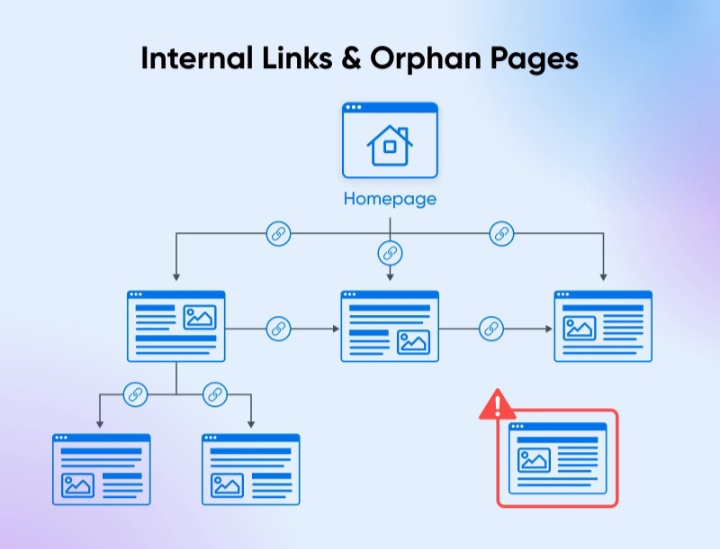
Orphan pages SEO problems rarely announce themselves. There’s no alert in Search Console, no obvious error in a crawl summary, no broken layout. What you usually see instead are pages that never pick up impressions, sections of a site that never gain traction, or a slow decline after a migration that “looked fine” on the surface.
I’ve run into this most often during audits where everything checks out technically (status codes are clean, sitemap is submitted, pages are indexed) and yet large parts of the site just don’t perform. When you crawl the site and then compare it against a full URL export from the CMS or analytics, that’s when it shows up: dozens, sometimes thousands of URLs that the crawler never found.
Those are orphan pages. And once you see how they behave in a real environment, it becomes clear why they drag down performance in ways that are easy to miss.
What an Orphan Page Looks Like
An orphan page is simply a URL with no internal links pointing to it. The definition is straightforward, but the way it appears in a real site is less obvious. You don’t notice it by browsing. You notice it when datasets don’t match.
A typical workflow is this: you run a crawl with Screaming Frog, export all discovered URLs, then compare that list against a full export from your CMS or a list of URLs pulled from analytics. Anything present in the CMS but missing from the crawl is, by definition, disconnected from your internal link structure.
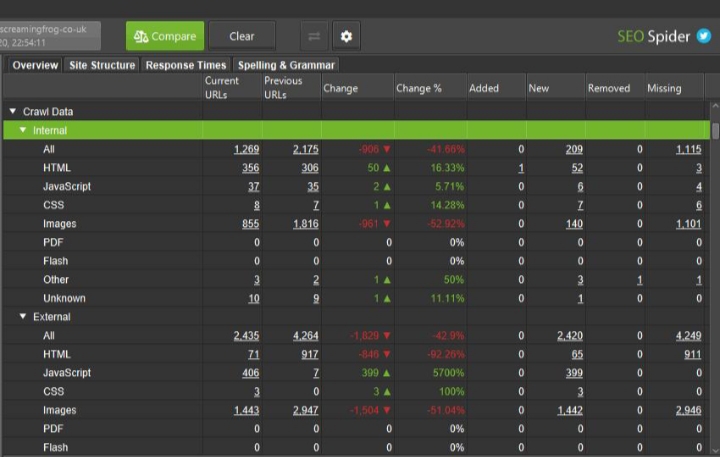
On a recent audit, that gap was around 18% of the site. Not edge-case pages—actual product and content URLs that had simply fallen out of the internal linking system over time.
That’s the key point. These pages are not broken. They’re just invisible to the structure that search engines rely on.
Why Orphan Pages SEO Issues Show Up as “Nothing is Working”
The first thing people expect is deindexing. That does happen, but more often the pages are technically indexed and still useless.
What you see instead is a pattern: impressions stuck at zero or near-zero, even for pages targeting reasonable queries. You check the content, and it’s not terrible. You check backlinks, and maybe there are a few. But the page just doesn’t move.
This comes down to internal signals. Google has been consistent about using links as a primary discovery and prioritization method, as outlined in its documentation on crawlable links. If a page isn’t part of that link graph, it sits outside the normal flow of crawling and ranking.
So even if it’s indexed, it’s weak. It has no internal reinforcement, no contextual placement, and no clear role in the site.
That’s why orphan pages don’t always look broken. They just don’t do anything.
Where They Actually Come From
In most cases, orphan pages are the result of normal site evolution rather than a single mistake.
Migrations are a major source. You move from one structure to another, navigation changes, categories get merged or removed, and some URLs lose their internal links in the process. Everything redirects correctly, so no alarms go off, but parts of the old structure are no longer connected.
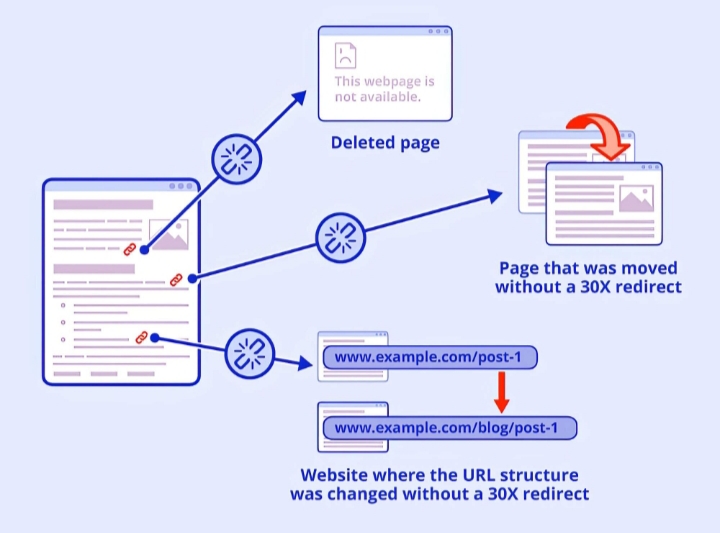
Content workflows create another layer. On teams publishing regularly, it’s common for new posts to go live without being added to hub pages or linked from older content. Over time, those posts drift further away from the core structure.
Then there are CMS-specific quirks. Shopify, for example, often generates product URLs that are only accessible through filtered collections. If those collections aren’t linked properly, the products effectively become isolated. WordPress sites with heavy use of page builders can do something similar when landing pages are published outside the normal taxonomy.
And then there’s cleanup. Removing a category or updating navigation can quietly orphan dozens of pages in one change. It’s usually not one big failure. It’s accumulation.
Why Orphan Pages SEO Damage isn’t Immediate, But it Adds Up
If orphan pages caused instant ranking drops, they’d be easier to catch. The problem is that the impact is gradual.
First, crawling becomes inconsistent. Pages might get visited once, then not again for weeks. If you look at server logs, you’ll often see long gaps between hits from search engine bots on these URLs.
Then rankings stall. Pages that should at least test in lower positions never get there. They don’t gather enough signals to compete.
Over time, this affects the rest of the site. Internal linking is how authority flows. When pages are cut off, that flow becomes uneven. Some sections get stronger, others quietly weaken.
I’ve seen this show up after migrations where traffic didn’t drop immediately, but plateaued and then slowly declined over three to four months. Fixing internal links (including reconnecting orphan pages) reversed part of that decline without any new content being added.
Common Mistakes that Keep Orphan Pages in Place
1. The most common one is relying on sitemaps as a safety net. Yes, submitting an XML sitemap through Google Search Console helps with discovery, but it does not replace internal linking. Pages in a sitemap without internal links are still treated as lower priority.
2. Another mistake is assuming that if a page is indexed, it’s fine. Indexation is not the same as performance. Many orphan pages sit in the index and never receive meaningful traffic.
3. There’s also a tendency to focus only on new content. Older pages lose links over time as structures change, and no one goes back to reconnect them. Those pages often had existing authority, which is then wasted.
4. Automated publishing pipelines can create orphan pages by default if they don’t include internal linking steps. This is common on larger editorial or programmatic SEO setups.
What to Check Before Fixing Anything
Before you start adding links, confirm what you’re dealing with. Not every orphan page needs to be saved.
Start by identifying them properly. Compare crawl data with a full URL list. If possible, look at server logs to confirm crawl activity. Pages that never get hit are strong candidates.
Then evaluate intent. Some pages are intentionally isolated, like paid campaign landing pages. Others may be outdated or redundant.
For the rest, look at value signals. Does the page have backlinks? Has it ever generated traffic? Is it part of an important topic cluster? Those are the ones worth reconnecting.
This step matters. Otherwise, you end up reintegrating low-value pages and adding noise to your structure.
How to Reconnect Pages Without Creating New Problems
The fix is not just “add links.” Where and how you add them changes the outcome.
Start with pages that already carry weight, category pages, high-traffic articles, or core product listings. Linking from these pages passes both authority and context.
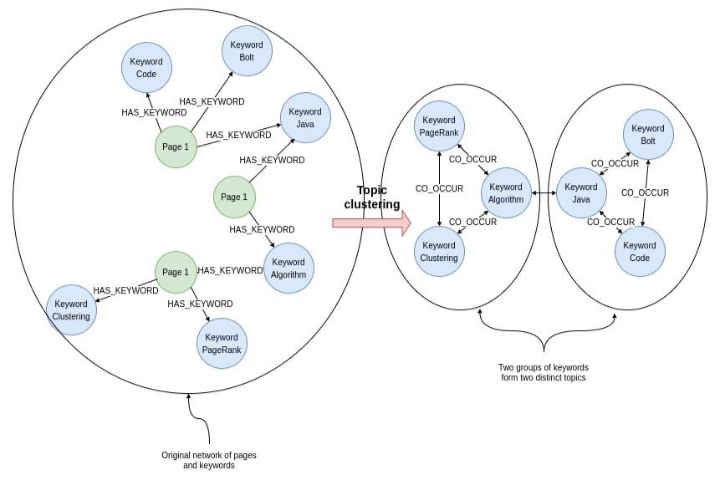
Keep the placement natural. If a link feels forced, it probably is. Internal links should reflect real relationships between topics or products.
In some cases, merging content works better than linking. If an orphan page overlaps heavily with another, combining them can strengthen the overall page instead of splitting signals.
And sometimes the right move is removal. If a page no longer serves a purpose, redirecting it can simplify the structure and consolidate value.
There’s no single fix. It depends on the role the page should play.
Where this Becomes a Recurring Issue
On smaller sites, orphan pages are usually manageable. On larger or frequently updated sites, they tend to come back unless there’s a process in place.
Teams that publish often need a linking step built into their workflow. Migrations need link validation beyond redirects. Navigation changes need post-launch audits.
Without that, orphan pages are not a one-time problem. They’re a pattern.
And because they don’t break anything outright, they tend to stay unnoticed longer than they should.
A page can exist, be indexed, and still be effectively absent from your site. Once you start looking for that gap, you’ll find more of them than expected.