
The first time SQL window functions stop feeling like a tutorial topic is usually not during a clean demo, but in a messy warehouse query that has to survive late events, duplicate rows, and one unhappy dashboard. That is where they earn their keep. They let you look across related rows without flattening the result into a single group, which sounds tidy on paper and turns out to be very useful when the data keeps moving.
People often meet them through ROW_NUMBER(), RANK(), or a running total. Fine, but that is only the front door. The more interesting use is when a query needs memory: the previous event, the first purchase, the latest version of a record, the gap between two timestamps, the share of total revenue contributed by one row. These are ordinary tasks in finance, product analytics, fraud review, and operational reporting. They are also the sort of tasks that become awkward fast if you try to force them through GROUP BY or a pile of self-joins.
There is a reason the better references keep circling back to the same mechanics. PostgreSQL’s window functions tutorial is still one of the clearest starting points, and the syntax in BigQuery’s analytic function guide is a good reminder that the idea is portable even when the engine-specific details are not. The concept stays the same. The execution details do not.
SQL Window Functions Beyond Ranking
A window function computes over a set of rows tied to the current row, but it leaves the rows intact. That difference is the whole trick. A grouped query gives you one row per group. A windowed query gives you the group’s context while still keeping each row visible. That is a very different shape of result, and it opens up a lot of room for cleaner SQL.
One common pattern is a cumulative balance. Imagine an account ledger. You do not want to collapse transactions into a single total and lose the sequence. You want the balance after each transaction, in order, with the ability to trace exactly how that number was reached. A query like SUM(amount) OVER (PARTITION BY account_id ORDER BY transaction_time ROWS BETWEEN UNBOUNDED PRECEDING AND CURRENT ROW) gives you that trail without extra application logic.
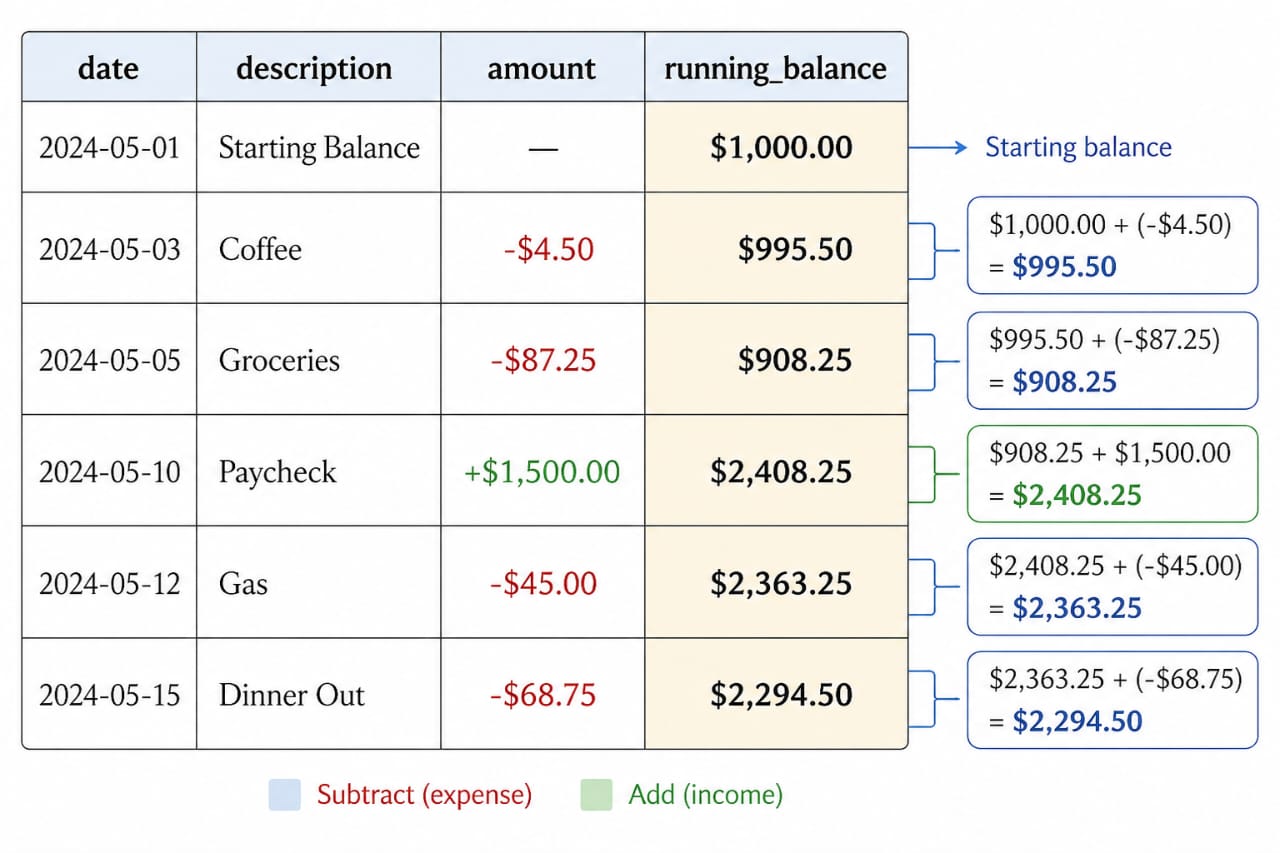 A running total is the easiest place to see the value of a window function. Instead of collapsing the data into one total, the query keeps every transaction visible and adds a balance beside it. That makes it easier to audit, easier to explain, and much less fragile than moving the logic into application code.
The same shape appears in inventory systems, event billing, and usage metering. You record events. You derive state. That is often safer than storing mutable state everywhere and trying to keep it in sync.
Where the Useful Work Happens
The practical value shows up most clearly when you need one row to “see” its neighbors. LAG() and LEAD() are the obvious examples. They are used to measure time between events, detect session breaks, compare version changes, and spot abrupt shifts in behavior. A login stream, for instance, can be grouped into sessions by looking for gaps greater than a threshold. That is a straightforward query once you have row-to-row comparison built into the language.
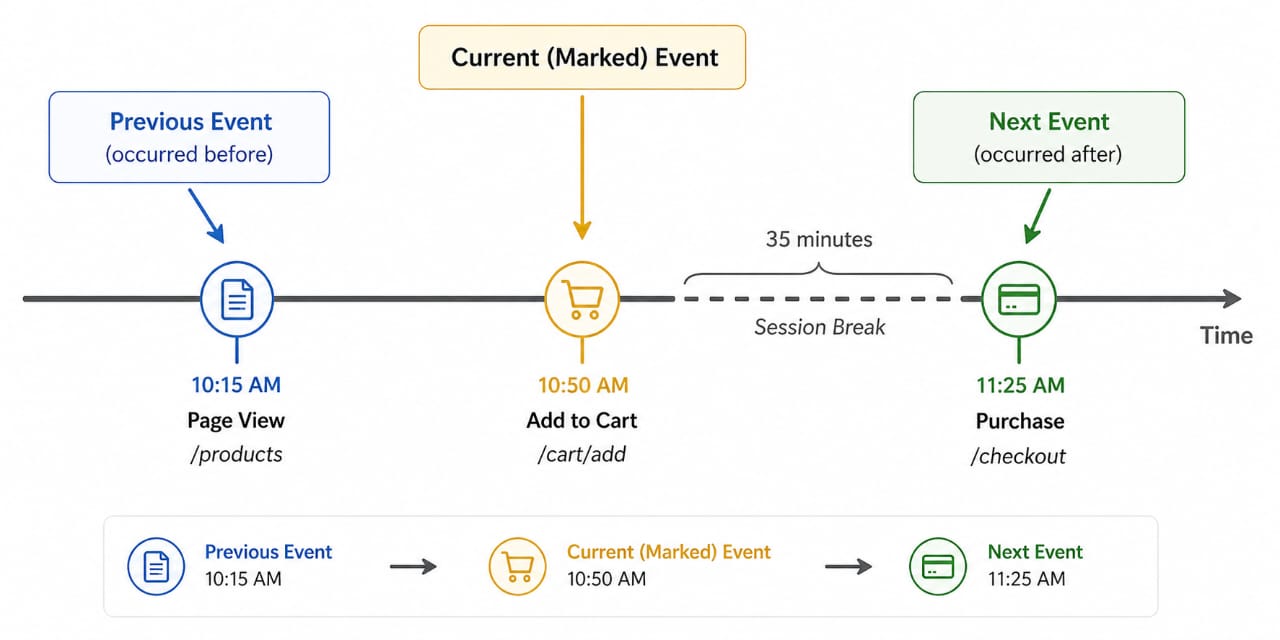 Window functions become more useful when the data is ordered and the question depends on the row before or after the current one. That is where LAG() and LEAD() help. They let you compare adjacent events without building a self-join just to recover sequence
That same pattern is common in fraud review. A normal sequence of purchases looks one way; a burst of activity from a new location or device looks another. Window functions let you express those comparisons directly against the event stream. You do not need to build a separate staging table just to answer a question about order and distance.
They also help with deduplication, which is less glamorous but usually more urgent. When a warehouse receives multiple copies of the same business record, the question is rarely “how many are there?” It is usually “which one should survive?” A deterministic ROW_NUMBER() partitioned by the business key and ordered by update time or version is often the cleanest answer. That beats a vague DISTINCT every time, because it makes the tie-breaker visible.
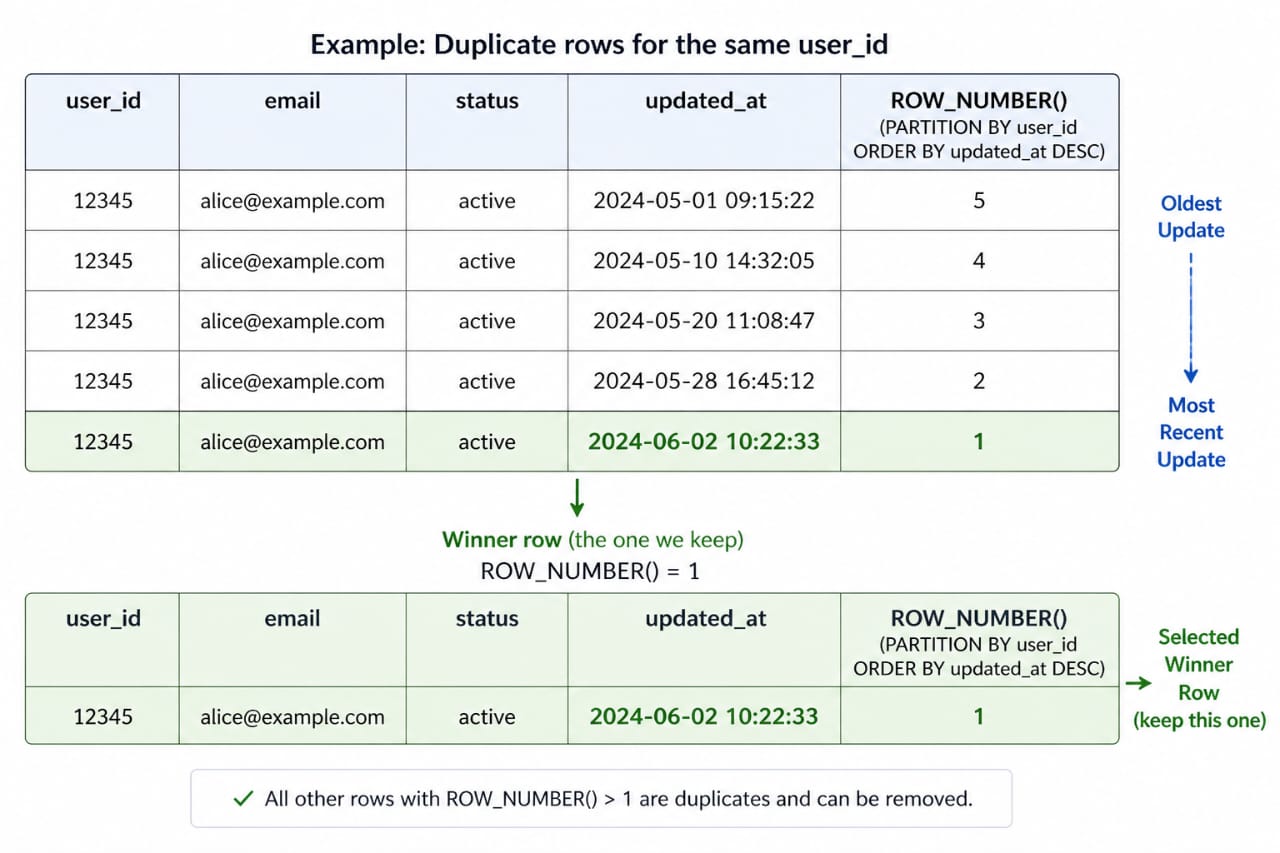 In production data, duplicates are rarely exact copies. They are more often competing versions of the same record, each with a slightly different timestamp or source. A window function gives you a deterministic way to choose one row and explain exactly why it won.
For cohort work, the pattern is equally blunt. Find the first event for each user, then measure later activity against that anchor. The query stays legible. The dataset stays flat. You avoid a mess of self-joins that tends to expand just when the dashboard starts to matter to someone in a meeting.
Distribution work is another quiet strength. Functions such as NTILE(), PERCENT_RANK(), and CUME_DIST() make it possible to segment users, orders, or tickets by relative position rather than absolute value. That is useful for pricing bands, risk buckets, support queues, and any analysis where the spread of values tells you more than the average does.
SQL Window Functions and the Places They Fail
The first failure mode is cost. Window functions often require sorting, and sorting large partitions is not cheap. If the partition is huge or unbounded, memory pressure rises quickly. Some engines will spill to disk, and once that starts, a query that looked harmless on a small sample can turn into a very different animal on production data. This is one of those cases where the test dataset lies politely.
The second failure mode is the default frame. This one catches people even after they have been using window functions for a while. In several engines, the default frame behaves differently from an explicit ROWS frame, especially when there are duplicate sort values. That can distort running totals and other cumulative calculations. The safer habit is simple: when the order matters, write the frame out instead of trusting the default. The SQL standard allows a range of frame behavior, and that flexibility is useful until it is not. The SQLite window functions documentation is a good compact reference for the mechanics.
Another issue is incremental refresh. A windowed query often wants the whole partition, not just the new row you inserted today. That makes some pipelines awkward to refresh cheaply. If a report only needs to be rebuilt once a night, that may be acceptable. If it has to update every few minutes, the design needs more thought. Sometimes the fix is a materialized view. Sometimes it is a different data model. PostgreSQL’s materialized views documentation is worth reading before you assume recomputation will stay cheap forever.
There is also a human cost. A query packed with six different window specs can be hard to read, even when it is technically correct. Different partition keys, different sort keys, different frames. It all works, but it stops being easy to reason about under pressure. That is usually the moment where a query should be split into stages, not admired for density.
Before You Use Window Functions: Partition Size, Ordering, and Repeatability
Before leaning on window functions in a production query, check the size and shape of the partitions. A narrow partition, such as one user or one account, is very different from a partition that accidentally contains half the warehouse. The engine may handle both, but not with the same cost.
Check the ordering column as well. If your query depends on event time, make sure that column is trustworthy and consistently populated. A window function can only respect the ordering you give it. If the upstream system writes timestamps late, or out of sequence, the result can be technically correct and still operationally wrong.
Check ties. If two rows can share the same ordering value, decide how the engine should break the tie. Add a second sort key if needed. This is especially important for deduplication and latest-record logic. Ambiguity tends to surface only when someone asks a hard question about a single record that should have been obvious.
And check whether the query will run once or repeatedly. For repeated reporting, a precomputed table or materialized view may be the cleaner route. For exploratory work, the direct query is often enough. The tradeoff is usually about stability and load, not purity.
The Case for Row-Aware SQL
Used well, window functions give SQL a kind of short-term memory. That is the real advantage. They let you express sequence, distance, and position without leaving the database or pretending the data is simpler than it is. They are not a replacement for every grouped query, and they are not free. But they are one of the few tools that can describe a row in relation to its neighbors while still keeping the row itself visible.
That is a very ordinary need once systems start tracking events instead of states. It comes up in logs, ledgers, subscriptions, customer journeys, operational alerts, and every warehouse that has been around long enough to collect a few awkward edge cases. SQL window functions are useful there because they do not flatten the story too early. They let the story stay row-shaped a little longer.